Showing posts with label apple. Show all posts
Showing posts with label apple. Show all posts
Monday, October 14, 2013
Apple Reveals iCloud At WWDC 2011 And Its Free!
Apple has finally revealed iCloud at WWDC 2011. Steve Jobs defines this service as: "iCloud stores your content in the cloud and wirelessly pushes it to all your device. It automatically uploads it, stores it, and pushes it to all your devices." Managing content between our devices is never going to be the same again, thanks to iCloud.

iCloud will automatically store daily content such as your books, photos, videos, app data, music bought from iTunes and device settings via Wi-Fi. The Documents in the Cloud app will store projects that you make in the iWork suite and will sync it seamlessly across all your iOS devices.
PhotoStream is going to be a new gallery in the Photos app of your iOS device and will sync all the pictures that you take with Mac computers, other iOS devices, Apple TV and even Windows PCs. As soon as you take a picture on your iPhone, it will automatically be synced to other iOS devices, Mac computers and even Windows PCs as well as being stored in the cloud for 30 days.
iCloud will not be serving any ads to its users. iCloud is going to be offered free for all users and will be implemented in all devices running iOS 5. Users will get free storage of 5GB for contacts, mail and calendar. PhotoStream doesnt count.
Read More..
iCloud will automatically store daily content such as your books, photos, videos, app data, music bought from iTunes and device settings via Wi-Fi. The Documents in the Cloud app will store projects that you make in the iWork suite and will sync it seamlessly across all your iOS devices.
PhotoStream is going to be a new gallery in the Photos app of your iOS device and will sync all the pictures that you take with Mac computers, other iOS devices, Apple TV and even Windows PCs. As soon as you take a picture on your iPhone, it will automatically be synced to other iOS devices, Mac computers and even Windows PCs as well as being stored in the cloud for 30 days.
iCloud will not be serving any ads to its users. iCloud is going to be offered free for all users and will be implemented in all devices running iOS 5. Users will get free storage of 5GB for contacts, mail and calendar. PhotoStream doesnt count.

Thursday, October 10, 2013
It is here Official by Apple iPHONE 5
iPhone 5. The biggest thing to happen to iPhone since iPhone.
Thinner, lighter design. So much more than before. And so much less, too.
4-inch Retina display. It’s not just bigger. It’s just right.
Ultrafast wireless. Browse, download, and stream content at blazing-fast speeds.
A6 chip. Performance and graphics up to twice as fast.
iSight camera. The camera you love now shoots in panorama.
iOS 6. The world’s most advanced mobile operating system.
- Gallery: iPhone 5
- Gallery: iPhone 5
- Gallery: iPhone 5
- Gallery: iPhone 5
- Gallery: iPhone 5
- Gallery: iPhone 5
- Gallery: iPhone 5
It doesn’t seem possible. That an iPhone with so much — a larger display, a faster chip, ultrafast wireless technology, an 8MP iSight camera — could be so thin and so light. But it is. In fact, iPhone 5 is the thinnest and lightest iPhone ever.
Learn more about the design of iPhone 5
The 4-inch Retina display lets you see more of everything. And everything you see is vivid and lifelike. It’s a larger, more beautiful canvas made the right way. Because even though the display is bigger, iPhone 5 is the same width as iPhone 4S. So it’s just as easy to use with one hand.
Learn more about the features of iPhone 5
With support for the latest wireless technologies, iPhone 5 connects to more networks all over the world.* And Wi-Fi is faster, too. So you can browse, download, and stream content at remarkable speeds, wherever you happen to be.
Learn more about the features of iPhone 5
The all-new Apple-designed A6 chip in iPhone 5 is powerful but not power hungry. CPU performance and graphics performance are up to twice as fast as on the A5 chip. But even with all that speed, iPhone 5 gives you outstanding battery life.
Learn more about the features of iPhone 5

Compare iPhone models *Qualified customers only.
Order your iPhone online and get it delivered to your door. It ships free and ready to use.
Buy iPhone
Buy iPhone at the Apple Retail Store and we’ll activate it and set it up just the way you want.
Find a store
Get answers about iPhone and rate plans before you buy. Talk with a knowledgeable Specialist.
1-800-MY-APPLE
Use the Apple Store app to shop, make appointments, and more. Download now
- *Compared with iPhone 4S.
- Some features may not be available for all countries or all areas. Click here to see complete list.
- Some features, applications, and services are not available in all areas. See your carrier for details. Application availability and pricing are subject to change.
- LTE is available in select markets and through select carriers. Check with your carrier for details.
- The Transamerica Pyramid Building is a registered service mark of Transamerica Corporation.
- Home
- iPhone
About iPhone 5
More iPhone
- iPhone 4S Tech Specs
- iPhone 4 Tech Specs
- Compare iPhone models
- Tips and Tricks
- iPhone in Education
- iPhone for Students
- iOS for Developers
- Accessibility
- (PRODUCT) RED
iPhone in Business
Support
Shop the Apple Online Store (1-800-MY-APPLE), visit an Apple Retail Store, or find a reseller.
Copyright © 2012 Apple Inc. All rights reserved.
http://www.apple.com/iphone/

 Watch the keynote
  Watch the iPhone 5 video


Tuesday, October 8, 2013
We did it Siri on iPod Touch 4G Connected to Apple Servers Finally Video
Heres a new significant and big step on porting Siri on iPhone, iPod Touch and iPad. The last few weeks we saw many screenshots and videos showing Siri running on all iDevices but without connecting Apple servers. Now hackers has just did it.

Steven Troughton-Smith is the guy behind this progress. This guy was the first one worked on porting Siri on iPhone 4 with the iPhone developer Chpwn. Few minutes ago Chpwn confirmed on his timeline that siri connected Apples servers on iPhone 4 after hack session.
When Siri come to iPhone 4, 3GS, iPod Touch 4G, 3G, iPad ?
No official release date announced so far. But diffidently it looks very imminent.
Heres an interview with Steven the guy behind this great job.

Steven Troughton-Smith is the guy behind this progress. This guy was the first one worked on porting Siri on iPhone 4 with the iPhone developer Chpwn. Few minutes ago Chpwn confirmed on his timeline that siri connected Apples servers on iPhone 4 after hack session.
When Siri come to iPhone 4, 3GS, iPod Touch 4G, 3G, iPad ?
No official release date announced so far. But diffidently it looks very imminent.
Siri on iPod Touch 4G [Video] :
Update : Folks at 9to5mac filmed an interesting video that compared between iPhone 4 and iPhone 4S running SiriHeres an interview with Steven the guy behind this great job.
Mark: Where do you go from here with the port?
Steven: At this point it’s all about confirming this works across devices, making it reproducible (we got it working on two devices today), and documenting everything. It does require files from an iPhone 4S which aren’t ours to distribute, and it also requires a validation token from the iPhone 4S that has to be pulled live from a jailbroken iPhone 4S, and it’s about a 20-step process right now.
Mark: In its current state, is the port 100% functional, is there anything you would like to see work better?
Steven: Yes, it seems to be 100% functional. I’m working on the rough edges, but everything that works on the iPhone 4S seems to work here
Mark: Do you ever see Siri showing up in Cydia (or another jailbreak store) for non natively supported devices?
Steven: No, I could not be a part of that. I have no doubts that others will package this up and distribute it quasi-illegally, or try and sell it to people. I am only interested in the technology and making it work; proving that it works and works well on the iPhone 4 and other devices
Mark: So, you also got Siri working on the fourth-generation iPod touch, how is that working out?
Steven: We got chpwn’s iPod touch up and running with Siri after proving it works on my iPhone 4. Unfortunately the microphone on the iPod is nowhere near as good as the iPhone – you will notice that the Siri level meter hardly moves when you talk to it. While it does work, you have to speak loudly and clearly to the iPod
Mark: How long did porting take you, what was the “I got it” moment?
Steven: Basically, I already had everything I needed to make it work. I had spent a lot of time mapping out in my head exactly how Siri works on the iPhone. All I needed was access to a jailbroken iPhone 4S to put my hunch to the test. It literally took no longer than 10 minutes to put all the pieces in place and perform our first test on my iPhone 4, and it was an instant success.
Saturday, October 5, 2013
WWDC 2012 and the surprises Apple will announce jailbreak is on !!!
 WWDC 2012 and the surprises Apple will announce jailbreak is on !!!
With only a week to go before WWDC 2012 and the surprises Apple will announce there, today seems like a good time to release updates to our suite of free software to include the rocky-racoon jailbreak and untether developed by @pod2g and @planetbeing!
Today’s updates are:
- PwnageTool 5.1.1
- redsn0w 0.9.12b1
- cinject 0.5.4 (version 0.5.3 also had rocky-racoon but this includes some updates)
- ultrasn0w 1.2.7 (5.1.1 compatibility only - no new baseband support)
If you’ve already installed rocky-racoon, don’t bother reinstalling it unless you’ve had problems and would like to try a different tool. The underlying untethered jailbreak (rocky-racoon) is identical to what is already installed by last week’s tools like Absinthe, cinject-0.5.3, and the rocky-racoon Cydia package — only the injection method offered by the above tools differs.
redsn0w allows owners of A4+earlier devices to install rocky-racoon two different ways:
- backup/restore method similar to Absinthe and cinject
- its traditional limera1n-based ramdisk install. If you have a lot of media on your A4 device (music, movies, TV shows, etc), then the ramdisk method is preferrred because it avoids any possibility of later problems related to syncing to iCloud (including Photo Stream and Music Match). The ramdisk method is not available for A5 devices or later because limera1n can’t be used. If you’d like to use redsn0w’s ramdisk method, just be sure to put the A4 device in DFU or Recovery mode before starting redsn0w (otherwise it will immediately start to use the backup/restore method).
We’ve also added a new redsn0w feature specifically for those who got in on the SAM unlock: you can now include your SAM tickets as part of your initial ramdisk jailbreak of iPhone4 or earlier, or alternatively you can upload your SAM tickets to any device after its been jailbroken. redsn0w accepts either the individual SAM activation ticket plist file, or the entire zip file created by redsn0w’s “Backup” button. As usual, redsn0w continues to cover all of its previous jailbreaks and untethers (so redsn0w-0.9.12b1 covers everything from 5.1.1 all the way back to 4.1).
PwnageTool also avoids any possible sync issues, but again it applies only to A4+earlier devices.
If you unlock your iPhone with ultrasn0w or a commercial method, you must use PwnageTool to avoid updating your baseband otherwise you’ll lose the unlock. PwnageTool will also jailbreak+untether the AppleTV2,1 5.0_2B206f (unless you customize the IPSW further, you’ll have just basic SSH access to the device).
If you’d like to contribute to those that actually developed rocky-racoon, please visit here (any other links you may see are not going to the actual rocky-racoon developers, they’re being diverted to other “related” or fraudulent accounts).
This particular jailbreak brought an unusual amount of fanfare and hoopla to the table, including “press releases” and other haughty silliness.
We’d just like to take this opportunity to remind everyone that jailbreaking is about freedom, not fame and donations!
Here are the download links. Please use our comment section below to give feedback. Enjoy!
- PwnageTool 5.1.1 (OS X)
- redsn0w 0.9.12b1 (OS X)
- redsn0w 0.9.12b1 (Windows — run in Administrator Mode)
- cinject 0.5.4 (OS X + Windows)
- ultrasn0w 1.2.7 — install this via Cydia
Monday, September 30, 2013
How to Jailbreak Apple TV 2G Untethered on iOS 4 3 1 using Seas0nPass
Pre-launch checklist
Step 1: Unzip the Seas0nPass.zip file and launch Seas0nPass.
 Step 2: If your AppleTV is not yet jailbroken, select Create IPSW. (if already jailbroken, and you just need to do a tethered boot scroll down).
 Step 3: The latest AppleTV software will be downloaded and used to create a custom jailbroken software file.
 Step 4: When prompted, connect your AppleTV using a micro-USB cable (leave power disconnected), and hold both the MENU and PLAY/PAUSE buttons for 7 seven seconds.
 Step 5: iTunes will open automatically and start the restore process.
 Step 6: iTunes will confirm the restore when complete - your AppleTV is now jailbroken. Please proceed to the tethered boot section below.
Note: The AppleTV MUST be disconnected from the computer (for at least a brief moment) after restoring in iTunes for the tethered boot process below to work properly.
Step 1: Open Seas0nPass and select the Boot Tethered option.
Step 2: When prompted, connect the AppleTV to your computer via USB. Wait for the rapid flashing light then connect the power. Once both are connected hold both the MENU and PLAY/PAUSE buttons for 7 seven seconds.
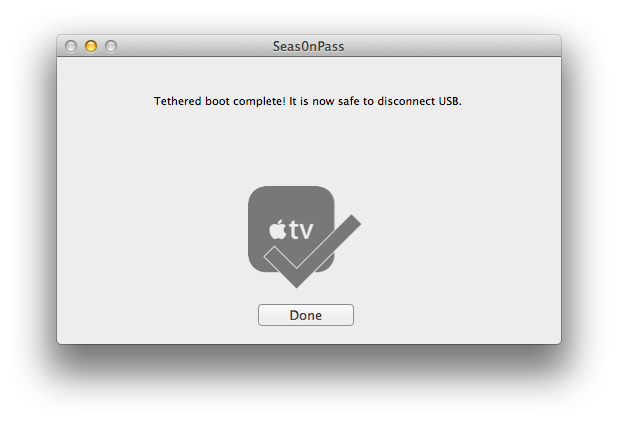
 Step 3: Seas0n Pass will complete the tethered boot automatically. Once complete, remove the USB cable and connect the HDMI cable.
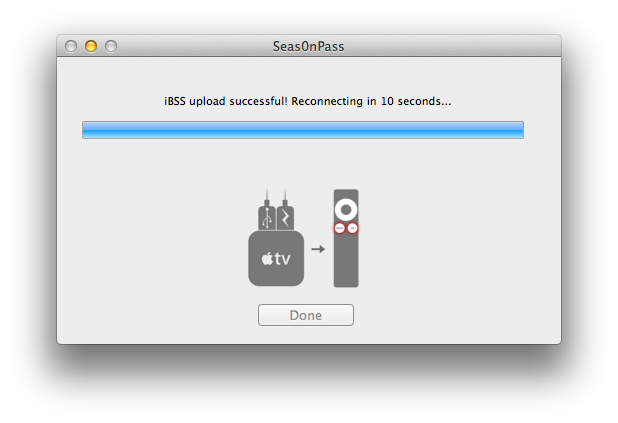
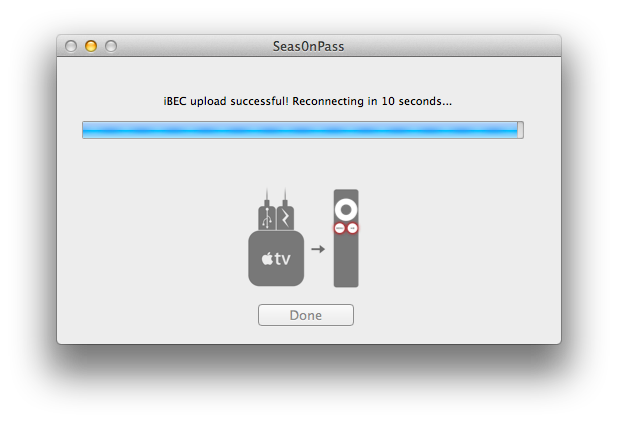
Note: Timing is key. Once the you receive the success message shown below, the USB cable should be removed and HDMI cable connected before the light on the front of the AppleTV stops flashing. (Dont worry there is ample to do this, so you dont need Superman speed).

Read More..
- Make sure youre running the latest version of iTunes.
- Download Seas0nPass: Mac [10.6 or later] | Windows [XP or later]
- A micro USB cable will be required to complete the jailbreak.
- Disconnect all iPods, iPhones, and iPads from the computer before running Seas0nPass.
Step 1: Unzip the Seas0nPass.zip file and launch Seas0nPass.
Using Seas0nPass for a tethered boot
Some AppleTV software versions require a tethered boot. This means the AppleTV must be connected to a computer for a brief moment during startup.Note: The AppleTV MUST be disconnected from the computer (for at least a brief moment) after restoring in iTunes for the tethered boot process below to work properly.
Step 1: Open Seas0nPass and select the Boot Tethered option.
Note: Timing is key. Once the you receive the success message shown below, the USB cable should be removed and HDMI cable connected before the light on the front of the AppleTV stops flashing. (Dont worry there is ample to do this, so you dont need Superman speed).
Thursday, September 26, 2013
Free Apple Serial Number Info
 | Model: | - iPhone 4 (16 GB White) | |
| Codename: | - N90 | ||
| Build Country: | - We have no clue where your unit was built. | ||
| Build Year: | - We could not verify the build year of this unit. | ||
| Build Week | - Your device was built in week 25 of that year (June). | ||
| Production Nr.: | - Your device was number 2779 to be built that week. | ||
| Source: | AppleSerialNumberInfo.com |
| Processor | Storage and Memory | Display | ||||||||||||||||||||||||||||||
|
|
| ||||||||||||||||||||||||||||||
| Networking | Power | Repair and Support | ||||||||||||||||||||||||||
|
| |||||||||||||||||||||||||||
| Requirements | Size and Weight | ||||||||||||||||||||||||||||||||||||||||
|
| ||||||||||||||||||||||||||||||||||||||||
| Misc information | Misc information | Current value // Powered by SellYourMac.com | ||||||||||||||||||||||||||||||||||||
|
| |||||||||||||||||||||||||||||||||||||
Apple Serial Number Info // Decode your Macs serial number!
Wednesday, September 25, 2013
iOS 6 beta no longer requires Apple ID password for free apps
With the latest beta of iOS 6, users are no longer required to enter their Apple ID password when downloading free software from the App Store.
The change, currently available to developers testing the latest preview of iOS, was first discovered by a poster on Reddit and highlighted on Monday by Cult of Mac. Its unknown whether that functionality will come to users in the final release of iOS 6, when it launches for the iPhone, iPad and iPod touch this fall.
Since the first beta of iOS 6 was released in June, developers have already been able to re-download previously purchased applications without entering the password for their Apple ID account. By removing the need to enter a password when downloading free software in the latest beta, it would appear that Apple is looking to cut down on the number of times iOS users are prompted to enter their Apple ID password.
With an Apple ID account on an iOS device, a users credit card information is stored and content like applications and music can be quickly purchased by simply entering the account password. But many of the selections available on the App Store are free software which does not result in a charge to the users credit card.
Regardless, in all current public builds of Apples iOS mobile operating system, users are required to enter their password. If a transaction was completed recently, users are given a 15-minute window during which additional purchases can be made.

One notable exception to the 15-minute window applies to in-app purchases. That change was made by Apple with iOS 4.3 in March of 2011 in response to complaints from parents whose children made expensive in-app purchases when using so-called "free to play" games available on the App Store.
iOS also includes built-in restrictions that can allow users to disable functions like installing or deleting applications from the App Store. In-app purchases can also be specifically barred from the built-in Settings application in iOS.
The App Store itself will also be redesigned and improved when iOS 6 launches later this year. It sports a new look with a black theme at the top and bottom, and user interface tweaks like allowing applications to install in the background without returning users to the home screen.
The change, currently available to developers testing the latest preview of iOS, was first discovered by a poster on Reddit and highlighted on Monday by Cult of Mac. Its unknown whether that functionality will come to users in the final release of iOS 6, when it launches for the iPhone, iPad and iPod touch this fall.
Since the first beta of iOS 6 was released in June, developers have already been able to re-download previously purchased applications without entering the password for their Apple ID account. By removing the need to enter a password when downloading free software in the latest beta, it would appear that Apple is looking to cut down on the number of times iOS users are prompted to enter their Apple ID password.
With an Apple ID account on an iOS device, a users credit card information is stored and content like applications and music can be quickly purchased by simply entering the account password. But many of the selections available on the App Store are free software which does not result in a charge to the users credit card.
Regardless, in all current public builds of Apples iOS mobile operating system, users are required to enter their password. If a transaction was completed recently, users are given a 15-minute window during which additional purchases can be made.
One notable exception to the 15-minute window applies to in-app purchases. That change was made by Apple with iOS 4.3 in March of 2011 in response to complaints from parents whose children made expensive in-app purchases when using so-called "free to play" games available on the App Store.
iOS also includes built-in restrictions that can allow users to disable functions like installing or deleting applications from the App Store. In-app purchases can also be specifically barred from the built-in Settings application in iOS.
The App Store itself will also be redesigned and improved when iOS 6 launches later this year. It sports a new look with a black theme at the top and bottom, and user interface tweaks like allowing applications to install in the background without returning users to the home screen.
Tuesday, September 24, 2013
Apple Drops iOS 5 1 Beta 1

Just a quick heads-up: Apple just dropped iOS 5.1 beta 1 to developers. At a first glance the only new feature is dictation support in text input views. Other than that, they’ve probably fixed the battery issue but we can’t confirm that at the moment. Jailbreakers and unlocks STAY AWAY from this beta release.
Dictation Support in Text Input Views
On supported devices, iOS automatically inserts recognized phrases into the current text view when the user has chosen dictation input. The new UIDictationPhrase class (declared in UITextInput.h) provides you with a string representing a phrase that a user has dictated. In the case of ambiguous dictation results, the new class provides an array containing alternative strings. New methods in the UITextInput protocol allow your app to respond to the completion of dictation.
iPhone 4 Unlock With GEVEY SIM Blocked By Apple In iOS 5 Beta 2
Apple has blocked iPhone 4 unlock with GEVEY interposer SIM, earlier today Apple seeded iOS 5 beta 2 to developers with some minor changes which also included this. Musclenerd from iPhone-Dev team has confirmed that the hole has been patched and Gevey SIM won’t work with iOS 5 beta 2.

In a tweet today he said :

If you rely on unlock we strongly recommend you not to upgrade to iOS 5 beta 2. Gevey’s SIM Interposer was able to unlock the iPhone 4 by force activating the baseband using the emergency dialer. This hole was not patched in iOS 5 beta 1 release and Gevey SIM worked perfectly.

Apple could’ve waited for the final release but they didn’t and i believe GEVEY won’t try to release another version of Gevey interposer SIM. They most probably will wait for the final release of iOS 5 which is scheduled this fall.
Gevery SIM supported following basebands:
In a tweet today he said :
it’s surprising Apple closed Gevey interposer hole in b2 rather than waiting until final (maybe they were under pressure)
If you rely on unlock we strongly recommend you not to upgrade to iOS 5 beta 2. Gevey’s SIM Interposer was able to unlock the iPhone 4 by force activating the baseband using the emergency dialer. This hole was not patched in iOS 5 beta 1 release and Gevey SIM worked perfectly.
Apple could’ve waited for the final release but they didn’t and i believe GEVEY won’t try to release another version of Gevey interposer SIM. They most probably will wait for the final release of iOS 5 which is scheduled this fall.
Gevery SIM supported following basebands:
- 02.10.xx
- 03.10.xx
- 04.10.xx
- 05.14.xx
- 05.15.xx
- 05.16.xx
If your baseband is mentioned in the list above we strongly recommend you to stay away from iOS 5 Beta 2 as it’ll lock you iPhone4 and you won’t be able to use it for cellular services.
Saturday, September 21, 2013
Apple Working on More Accurate Methods to Detect Water Damage in iOS Devices
AppleInsider has discovered a new patent application filed by Apple titled "Mechanisms for Detecting Exposure to Water in an Electronic Device" that indicates that it is actively working on more accurate methods to detect water damage in iOS devices.
Currently, Apple uses LSIs (Liquid Submersion Indicators) or LCIs (Liquid Contact Indicators) in their iOS devices like the iPhone, which turn from white or silver to pinkish red when they come in contact with the liquid. The sensors are used by Apple to determine whether the device has failed due to water damage. But according to AppleInsider, these sensors are not accurate and completely fool-proof, which at times results in Apple giving away a replacement for a water damaged iOS device, which isnt covered under warranty. This could help Apple save costs that it is currently incurring when it gives away a replacement device. Apples patent proposes two possible solutions to address this issue. The first one is to use an "immersion detection mechanism". Apple describes an "immersion detection mechanism" included as part of the internal components of a device. This water sensor could be covered in a water-soluble conductive glue that would electrically insulate the gap between two conducting pieces. In the event that an iPhone or another device were to be submerged in water, this conductive glue would be permanently eroded by the water. The system would detect a change in impedance of the path, and would signal an alert to a data processor that would log water exposure events within the device.

The second one also talks about a circuit-based method: Another potential method described by Apple involves several water sensors arranged and connected as a randomly accessible sensor array. A current can be passed through these conductive paths, and a change in impedance can be detected, which would signal an alert to a data processor that would log potential water damage events.

It looks like Apple wants to save on the cost of replacing the iOS device by accurately finding out if the device was damaged by water, which is not covered by warranty.
We hope that Apple spends the time and energy in making their next generation iOS deices waterproof using technologies demonstrated by startups such as Hz0 and Liquipel so it would no longer need to figure out a more accurate solution to detect water damage and would be an ideal solution from a customer point of view as well. What do you think? Sound off in the comments.
Currently, Apple uses LSIs (Liquid Submersion Indicators) or LCIs (Liquid Contact Indicators) in their iOS devices like the iPhone, which turn from white or silver to pinkish red when they come in contact with the liquid. The sensors are used by Apple to determine whether the device has failed due to water damage. But according to AppleInsider, these sensors are not accurate and completely fool-proof, which at times results in Apple giving away a replacement for a water damaged iOS device, which isnt covered under warranty. This could help Apple save costs that it is currently incurring when it gives away a replacement device. Apples patent proposes two possible solutions to address this issue. The first one is to use an "immersion detection mechanism". Apple describes an "immersion detection mechanism" included as part of the internal components of a device. This water sensor could be covered in a water-soluble conductive glue that would electrically insulate the gap between two conducting pieces. In the event that an iPhone or another device were to be submerged in water, this conductive glue would be permanently eroded by the water. The system would detect a change in impedance of the path, and would signal an alert to a data processor that would log water exposure events within the device.
The second one also talks about a circuit-based method: Another potential method described by Apple involves several water sensors arranged and connected as a randomly accessible sensor array. A current can be passed through these conductive paths, and a change in impedance can be detected, which would signal an alert to a data processor that would log potential water damage events.
It looks like Apple wants to save on the cost of replacing the iOS device by accurately finding out if the device was damaged by water, which is not covered by warranty.
We hope that Apple spends the time and energy in making their next generation iOS deices waterproof using technologies demonstrated by startups such as Hz0 and Liquipel so it would no longer need to figure out a more accurate solution to detect water damage and would be an ideal solution from a customer point of view as well. What do you think? Sound off in the comments.
Tuesday, September 17, 2013
Jailbreak Your Apple TV 2G Using Seas0nPass Mac 4 4 3
These are instructions on how to jailbreak your Apple TV 2G on iOS 4.4.3 using Seas0nPass. Please note this a tethered jailbreak and will require the help of a computer to reboot your device if its powered off.
Step One
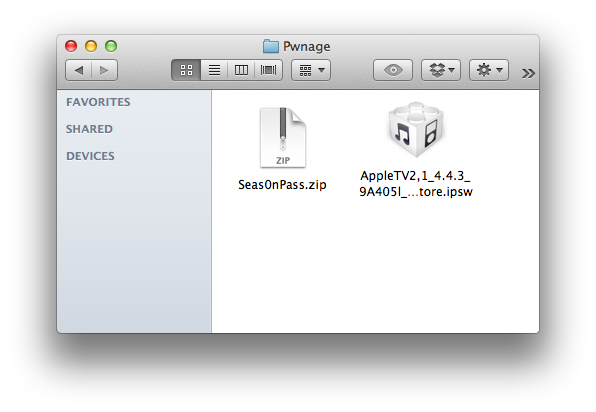
Create a Pwnage folder on your desktop. Download and place the latest version of Seas0nPass and the Apple TV 4.4.3 firmware ipsw into the folder.
- Seas0nPass
- Apple TV Firmware
Step Two
Double click the Seas0nPass archive to extract it. Then double click the extracted Seas0nPass application to launch it.

Step Three
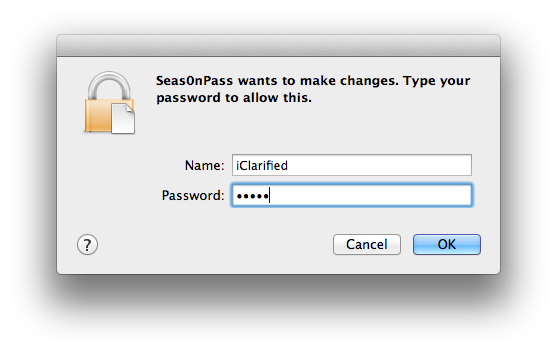
When prompted, input your administrative username and password then click the OK button.
Step Four
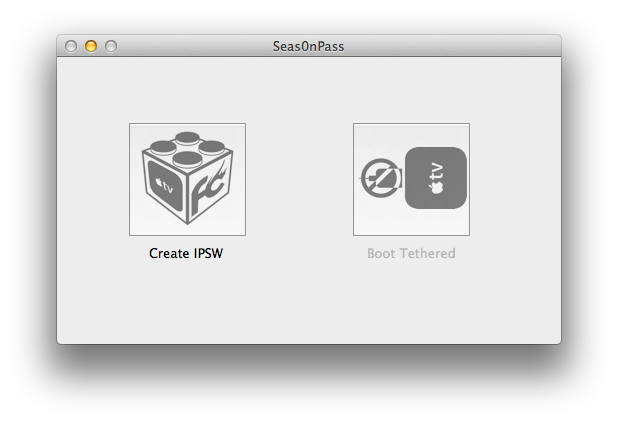
Hold down the Option key and click the Create IPSW button.
Step Five
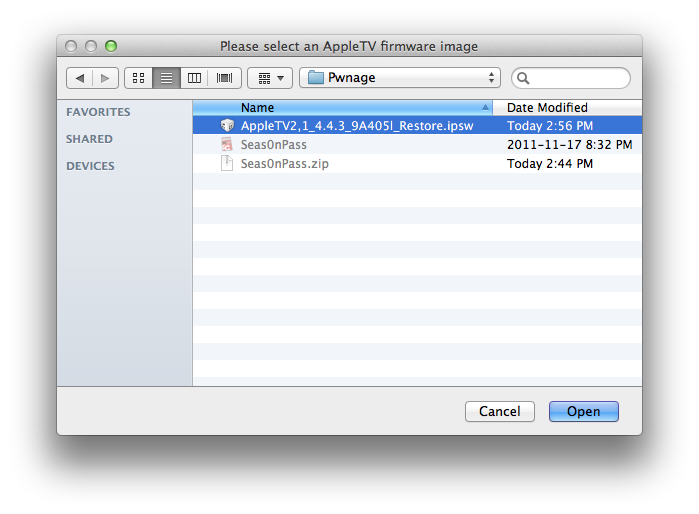
Select the Apple TV ipsw from the Pwnage folder on your desktop and click the Open button.
Step Six
Seas0nPass will now prepare your custom IPSW.
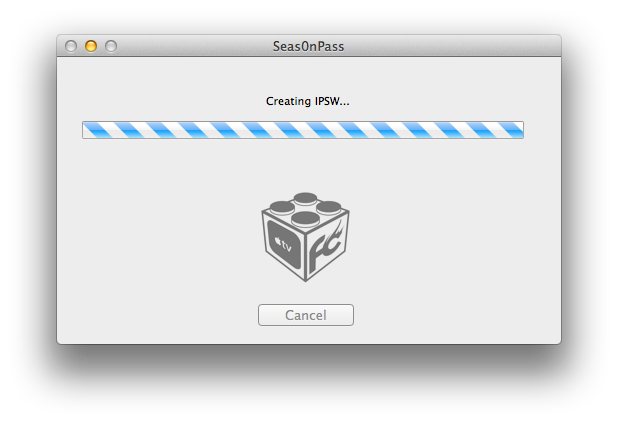
Step Seven
Once your custom IPSW file has been created, Seas0nPass will ask you to connect the Apple TV to your computer via a micro-USB cable and use the remote to put it into DFU mode by holding MENU and PLAY/PAUSE for 7 seconds. The power cable should be unplugged during this process. Immediately hold the buttons after inserting the USB cable.
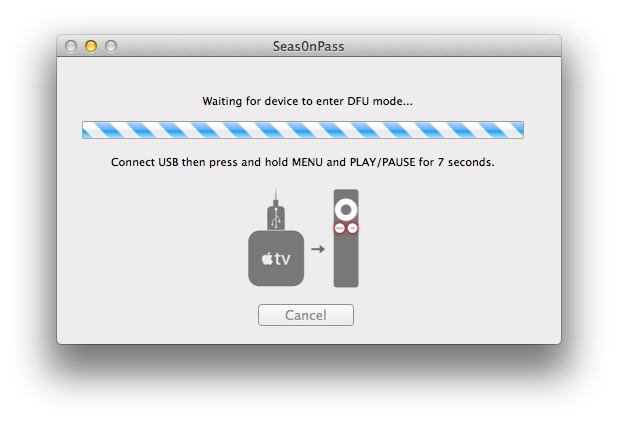
Step Eight
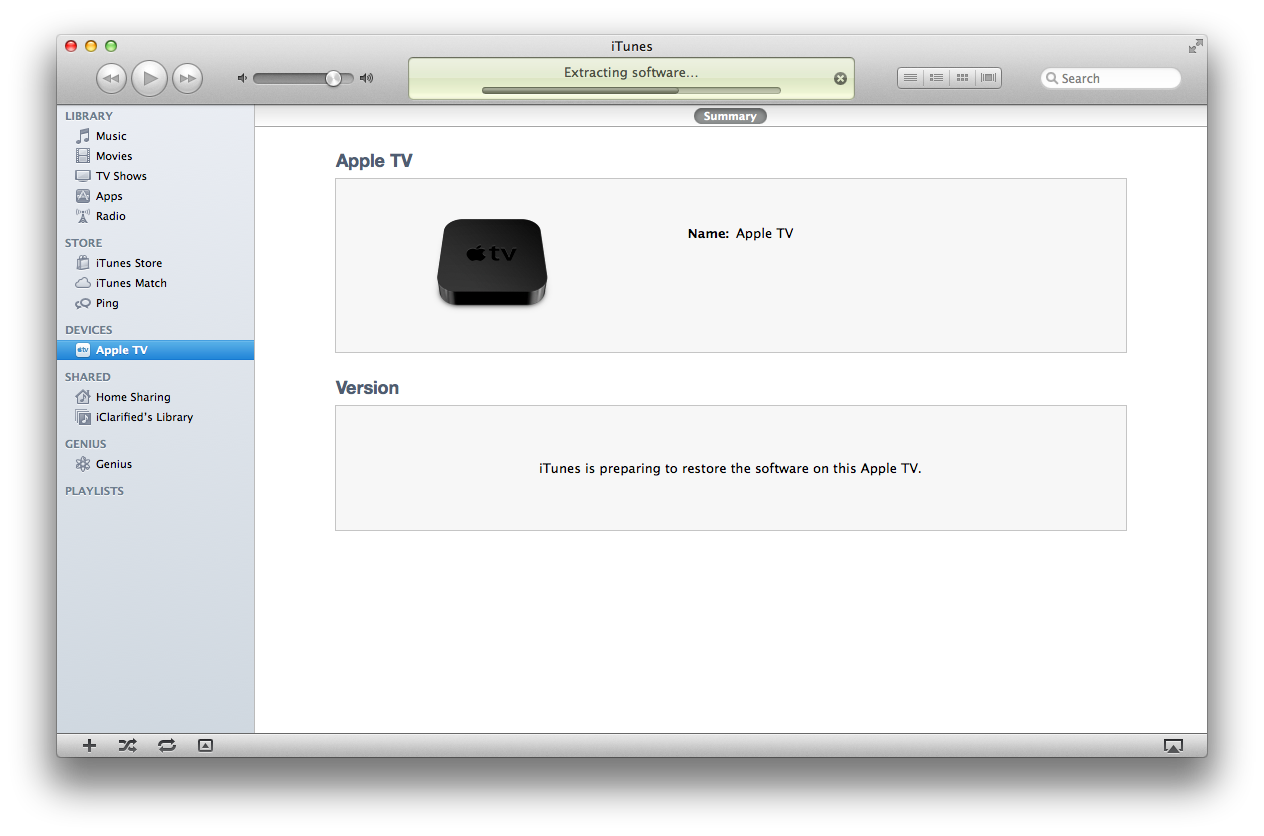
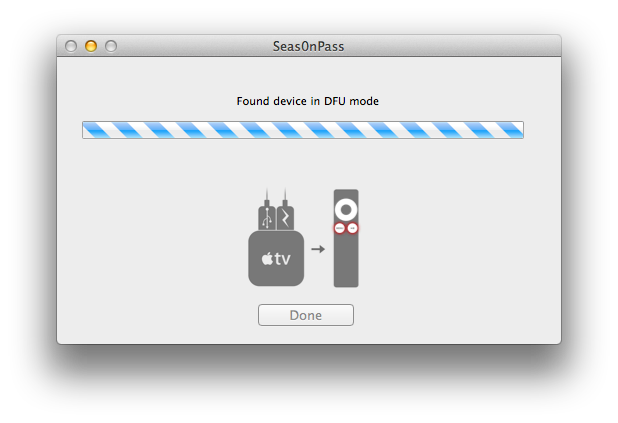
Once your Apple TV has been detected in DFU mode, Seas0nPass will upload some files, automatically launch iTunes, and beginning restoring to the new firmware.
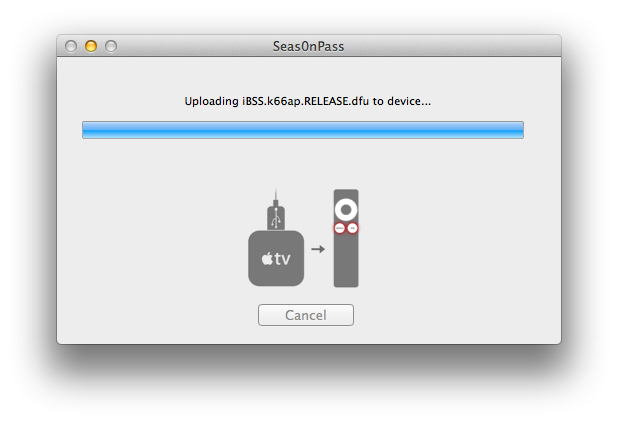
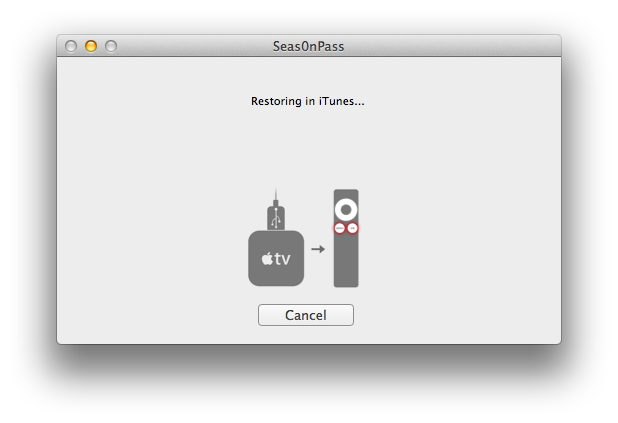
BOOT TETHERED
To boot your Apple TV you will need to follow these instructions.
Step One
Launch Seas0nPass by double clicking its icon.
Step Two
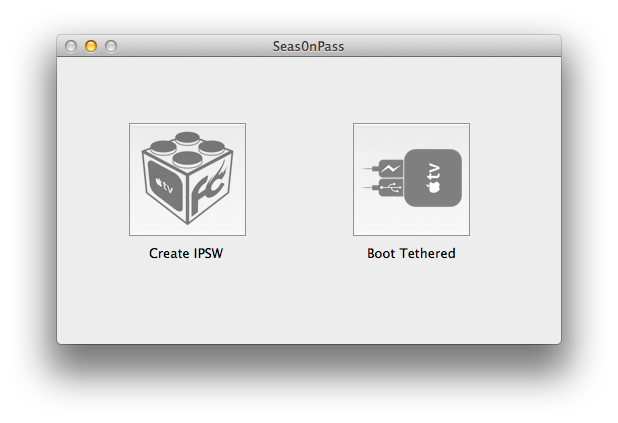
Select Boot Tethered from the main menu.
Step Three
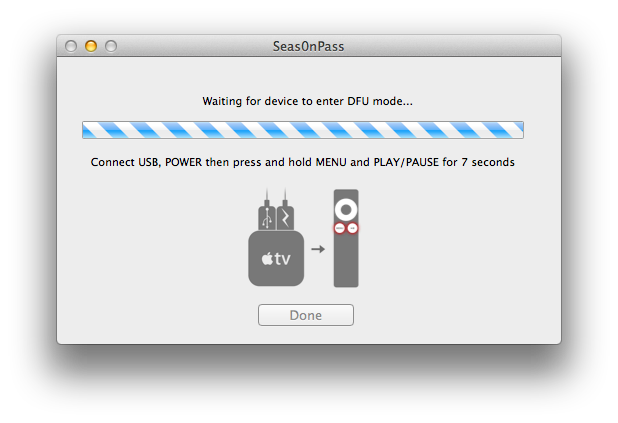
Connect the Apple TV to the computer via USB, plug it into the power outlet, and hold MENU and PLAY/PAUSE on the Apple TV remote for 7 seconds.
Step Four
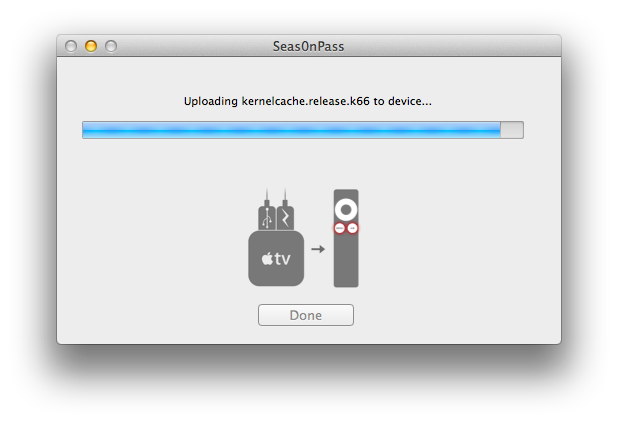
Seas0nPass will detect the device in DFU mode and begin the boot process.
Step Five
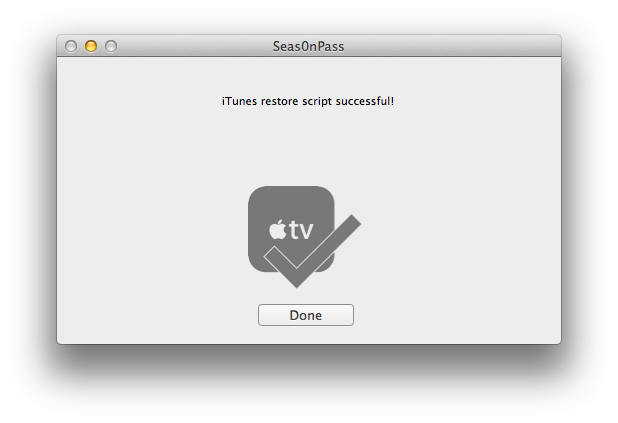
Once the tethered boot is complete you can remove the USB cable and connect the HDMI cable to begin using your jailbroken device!
Subscribe to:
Posts (Atom)