Showing posts with label beta. Show all posts
Showing posts with label beta. Show all posts
Thursday, October 10, 2013
Jailbreak iOS 6 beta with RedSn0w 0 9 13dev1
Earlier today, the iPhone Dev Team released RedSn0w 0.9.13dev1 to jailbreak the iOS 6 beta on certain iOS devices. Because this jailbreak is obviously aimed at developers only, the process and the results are a tad bit different that normal.
If you’re a developer, and you have an iPhone 4, 3GS, or iPod touch 4th generation running iOS 6 beta, then step inside as we showcase how to jailbreak with this development version of RedSn0w.
Note: This is aimed at developers only. Again, this will not install Cydia on your device, will not hacktivate, and it’s suggested that unlockers who want to preserve the baseband, stay away. This only works with iPhone 4, 3GS, and iPod touch 4th gen. No A5 Devices. This is a tethered jailbreak.
Step 1: Download and open RedSn0w 0.9.13dev1.
Step 2: Click Extras > Select IPSW, and point to your iOS 6 firmware file for your device.
Step 3: Click back and Click jailbreak. Place your device into DFU mode, and the jailbreak should begin. RedSn0w will prompt you to Install SSH. Make sure that option is checked, and click Next. the jailbreak will proceed until completion.
Step 4: Once on your Home screen, go back to RedSn0w and click Extras > Just boot. This will perform a tethered boot. You will need to place your device into DFU mode again to proceed.
Step 5: Once the tethered boot is completed, your device will go back to your Home screen. Congratulations, your device is now jailbroken. You can now use SSH, or another iPhone file navigation utility to browse the default file structure. This may allow you to install apps and tweaks manually if need be. Again, this is for advanced users only, as no GUI interface is there to help you through this process.

Wednesday, October 9, 2013
♥ ♥ iTools 2012 Beta 0913 English Released ♥ ♥
[QUOTE=TUR@N ALAM;176627]
Brand new interface with awesome experience.
Multitask mode, allow users to browse other modules when installing Apps or improting files.
iOS6 GM supported
iTunes10.7 supported
App Library optimized:
New features in displaying supported system versions.
Add tips to the applications when your system version is too low.
New features of cleaning up the old version Apps in the library now.
Image Management:
Quick View mode, to facilitate users quickly browse and zoom.
New features to classify images based on real-time.
New features to export images as a directory.
When importing images, iTools can auto sort by name and time now.
Applications:
Greatly improve the loading speed of the applications.
Tools Box:
Add ringtones making function to the tool box
iTools have solve the problem that does not recognize iPod devices.
Bugs fixed

in English
iTools 2012 Beta 0913E
Download

More update coming soon.........[/QUOTE]
Brand new interface with awesome experience.
Multitask mode, allow users to browse other modules when installing Apps or improting files.
iOS6 GM supported
iTunes10.7 supported
App Library optimized:
New features in displaying supported system versions.
Add tips to the applications when your system version is too low.
New features of cleaning up the old version Apps in the library now.
Image Management:
Quick View mode, to facilitate users quickly browse and zoom.
New features to classify images based on real-time.
New features to export images as a directory.
When importing images, iTools can auto sort by name and time now.
Applications:
Greatly improve the loading speed of the applications.
Tools Box:
Add ringtones making function to the tool box
iTools have solve the problem that does not recognize iPod devices.
Bugs fixed
in English
iTools 2012 Beta 0913E
Download
More update coming soon.........[/QUOTE]
Monday, October 7, 2013
Sn0wbreeze 2 8b1 Released To Jailbreak iOS 5 Beta 1 Tethered On Windows
iH8sn0w has finally updated sn0wbreeze. Sn0wbreeze 2.8b1 is now available for download and will jailbreak iOS 5 beta 1 tethered on iPhone, iPad and iPod touch.

sn0wbreeze v2.8 BETA 1 Release Notes:Please keep in mind that iOS 5 beta 1 jailbreak is tethered as of now and will require you to connect your jailbroken device to the computer every time you boot it up
————————————–
* Supports iOS 5.0 BETA 1 (9A5220p)
* Supports the following Devices:
- iPhone 3GS
- iPhone 4 [GSM]
- iPhone 4 [CDMA]
- iPod Touch 3G
- iPod Touch 4
- iPad 1G
————————————–
* Props to @MuscleNerd for the kernel patches. :)
————————————–
* THIS IS INTENDED FOR DEVELOPERS ONLY!!!
* This sn0wbreeze does NOT add afc2 or Hacktivate to prevent users from removing the UDID check after jailbreak.
* UNLOCKERS SHOULD STAY AWAY!!!
* This is a /TETHERED/ jailbreak via iBooty.
————————————–
Now available at: http://ih8sn0w.com/sb28b1
————————————–
// iH8sn0w
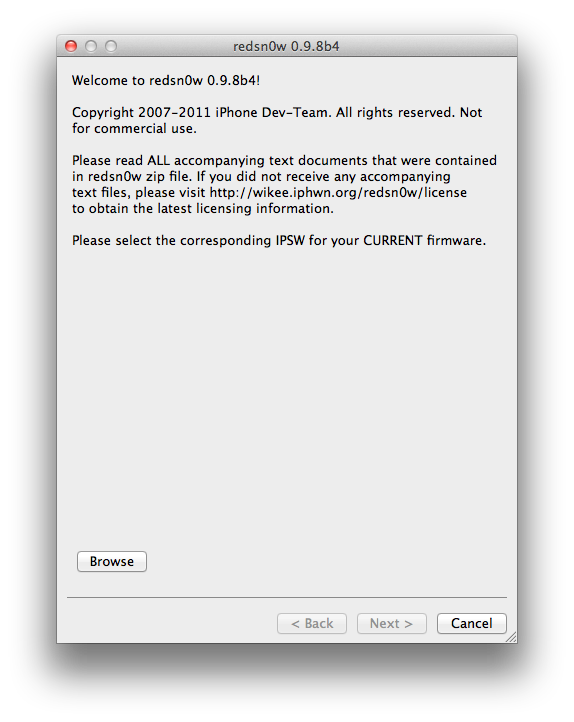
iPhone Dev Team Releases RedSn0w 0 9 8b4 to Jailbreak iOS 5 Beta 4
The iPhone Dev-Team has released RedSn0w 0.9.8b4 for developers to jailbreak iOS 5 Beta 4. Remember this is a tethered jailbreak.
In conjunction with iOS5 beta4 being released to iOS developers, redsn0w 0.9.8b4 is now available for jailbreak app developers. Remember, its a tethered jailbreak right now so youll need to use redsn0w to boot into a jailbroken state at each power cycle.
NOTE: It appears that by design, the OTA update that became available starting with iOS 5 beta4 will *not* be automatically applied to jailbroken devices. Thats a relief to those who dont want to lose their jailbreak via OTA pushes. If youre jailbroken, youll need to use the standard iTunes method to get to iOS 5 beta4.
You can download the new version of RedSn0w from here: Windows, Mac.
Friday, October 4, 2013
Sn0wbreeze v2 8 BETA 6


CHANGES:
* Now jailbreaks iOS 5 beta 6.
* Still removes UDID Developer check + Beta timer.
* Still has the ability to hacktivate.
* Still preserves the baseband (as always!).
---------------------------------
Supported Devices and Tethered?
---------------------------------
* iPhone 3GS (old bootrom).....NO
* iPhone 3GS (new bootrom)....YES
* iPhone 4 (GSM)..............YES
* iPhone 4 (CDMA).............YES
* iPod Touch 3G...............YES
* iPod Touch 4................YES
* iPad 1G.....................YES

Download Here
Thursday, October 3, 2013
iOS 6 beta 1 Firmware Direct Download Links
(Via: iphonehackiosdev)
Apple has released at the WWDC the iOS 6 beta 1 (build 10A5313k) for devellopers.
iPhone 4 S - Direct Link: iPhone4,1_6.0_10A5316k_Restore.ipsw
iPhone 4 GSM - Direct Link: iPhone3,1_6.0_10A5316k_Restore.ipsw
iPhone 4 CDMA - Direct Link: iPhone3,3_6.0_10A5316k_Restore.ipsw
iPhone 3GS - Direct Link: iPhone2,1_6.0_10A5316k_Restore.ipsw
iPad 3 Wi-Fi - Direct Link: iPad3,1_6.0_10A5316k_Restore.ipsw
iPad 3 Wi-Fi CDMA - Direct Link: iPad3,2_6.0_10A5316k_Restore.ipsw
iPad 3 Wi-Fi Global - Direct Link: iPad3,3_6.0_10A5316k_Restore.ipsw
iPad 2 Wi-fi - Direct Link: iPad2,1_6.0_10A5316k_Restore.ipsw
iPad 2 Wi-Fi + 3G - Direct Link: iPad2,2_6.0_10A5316k_Restore.ipsw
iPad 2 Wi-Fi + 3G CDMA - Direct Link: iPad2,3_6.0_10A5316k_Restore.ipsw
iPad 2 Wi-Fi (Rev A) - Direct Link: iPad2,4_6.0_10A5316k_Restore.ipsw
iPod touch 4th G - Direct Link: iPod4,1_6.0_10A5316k_Restore.ipsw
Torrent direct links:
iPhone 4S : download the torrent
iPhone 4GSM : download the torrent
iPhone 4 CDMA : download the torrent
iPhone 3GS : download the torrent
iPod touch 4th G : download the torrent


Sunday, September 29, 2013
Download iOS 5 0 1 beta Links
Download iOS 5.0.1 IPSW firmware files direct download links below. The update fixes bugs affecting battery life and brings back multitasking gestures to the original iPad.

iOS 5.0.1 beta contains improvements and other bug fixes including:
– Fixes bugs affecting battery life
– Adds Multitasking Gestures for original iPad
– Resolves bugs with Documents in the Cloud
– Improves voice recognition for Australian users using dictation
– Contains security improvements
iOS 5.0.1 beta introduces a new way for developers to specify files that should remain on device, even in low storage situations.
Wednesday, September 25, 2013
iOS 6 beta no longer requires Apple ID password for free apps
With the latest beta of iOS 6, users are no longer required to enter their Apple ID password when downloading free software from the App Store.
The change, currently available to developers testing the latest preview of iOS, was first discovered by a poster on Reddit and highlighted on Monday by Cult of Mac. Its unknown whether that functionality will come to users in the final release of iOS 6, when it launches for the iPhone, iPad and iPod touch this fall.
Since the first beta of iOS 6 was released in June, developers have already been able to re-download previously purchased applications without entering the password for their Apple ID account. By removing the need to enter a password when downloading free software in the latest beta, it would appear that Apple is looking to cut down on the number of times iOS users are prompted to enter their Apple ID password.
With an Apple ID account on an iOS device, a users credit card information is stored and content like applications and music can be quickly purchased by simply entering the account password. But many of the selections available on the App Store are free software which does not result in a charge to the users credit card.
Regardless, in all current public builds of Apples iOS mobile operating system, users are required to enter their password. If a transaction was completed recently, users are given a 15-minute window during which additional purchases can be made.

One notable exception to the 15-minute window applies to in-app purchases. That change was made by Apple with iOS 4.3 in March of 2011 in response to complaints from parents whose children made expensive in-app purchases when using so-called "free to play" games available on the App Store.
iOS also includes built-in restrictions that can allow users to disable functions like installing or deleting applications from the App Store. In-app purchases can also be specifically barred from the built-in Settings application in iOS.
The App Store itself will also be redesigned and improved when iOS 6 launches later this year. It sports a new look with a black theme at the top and bottom, and user interface tweaks like allowing applications to install in the background without returning users to the home screen.
The change, currently available to developers testing the latest preview of iOS, was first discovered by a poster on Reddit and highlighted on Monday by Cult of Mac. Its unknown whether that functionality will come to users in the final release of iOS 6, when it launches for the iPhone, iPad and iPod touch this fall.
Since the first beta of iOS 6 was released in June, developers have already been able to re-download previously purchased applications without entering the password for their Apple ID account. By removing the need to enter a password when downloading free software in the latest beta, it would appear that Apple is looking to cut down on the number of times iOS users are prompted to enter their Apple ID password.
With an Apple ID account on an iOS device, a users credit card information is stored and content like applications and music can be quickly purchased by simply entering the account password. But many of the selections available on the App Store are free software which does not result in a charge to the users credit card.
Regardless, in all current public builds of Apples iOS mobile operating system, users are required to enter their password. If a transaction was completed recently, users are given a 15-minute window during which additional purchases can be made.
One notable exception to the 15-minute window applies to in-app purchases. That change was made by Apple with iOS 4.3 in March of 2011 in response to complaints from parents whose children made expensive in-app purchases when using so-called "free to play" games available on the App Store.
iOS also includes built-in restrictions that can allow users to disable functions like installing or deleting applications from the App Store. In-app purchases can also be specifically barred from the built-in Settings application in iOS.
The App Store itself will also be redesigned and improved when iOS 6 launches later this year. It sports a new look with a black theme at the top and bottom, and user interface tweaks like allowing applications to install in the background without returning users to the home screen.
Tuesday, September 24, 2013
Apple Drops iOS 5 1 Beta 1

Just a quick heads-up: Apple just dropped iOS 5.1 beta 1 to developers. At a first glance the only new feature is dictation support in text input views. Other than that, they’ve probably fixed the battery issue but we can’t confirm that at the moment. Jailbreakers and unlocks STAY AWAY from this beta release.
Dictation Support in Text Input Views
On supported devices, iOS automatically inserts recognized phrases into the current text view when the user has chosen dictation input. The new UIDictationPhrase class (declared in UITextInput.h) provides you with a string representing a phrase that a user has dictated. In the case of ambiguous dictation results, the new class provides an array containing alternative strings. New methods in the UITextInput protocol allow your app to respond to the completion of dictation.
iPhone 4 Unlock With GEVEY SIM Blocked By Apple In iOS 5 Beta 2
Apple has blocked iPhone 4 unlock with GEVEY interposer SIM, earlier today Apple seeded iOS 5 beta 2 to developers with some minor changes which also included this. Musclenerd from iPhone-Dev team has confirmed that the hole has been patched and Gevey SIM won’t work with iOS 5 beta 2.

In a tweet today he said :

If you rely on unlock we strongly recommend you not to upgrade to iOS 5 beta 2. Gevey’s SIM Interposer was able to unlock the iPhone 4 by force activating the baseband using the emergency dialer. This hole was not patched in iOS 5 beta 1 release and Gevey SIM worked perfectly.

Apple could’ve waited for the final release but they didn’t and i believe GEVEY won’t try to release another version of Gevey interposer SIM. They most probably will wait for the final release of iOS 5 which is scheduled this fall.
Gevery SIM supported following basebands:
In a tweet today he said :
it’s surprising Apple closed Gevey interposer hole in b2 rather than waiting until final (maybe they were under pressure)
If you rely on unlock we strongly recommend you not to upgrade to iOS 5 beta 2. Gevey’s SIM Interposer was able to unlock the iPhone 4 by force activating the baseband using the emergency dialer. This hole was not patched in iOS 5 beta 1 release and Gevey SIM worked perfectly.
Apple could’ve waited for the final release but they didn’t and i believe GEVEY won’t try to release another version of Gevey interposer SIM. They most probably will wait for the final release of iOS 5 which is scheduled this fall.
Gevery SIM supported following basebands:
- 02.10.xx
- 03.10.xx
- 04.10.xx
- 05.14.xx
- 05.15.xx
- 05.16.xx
If your baseband is mentioned in the list above we strongly recommend you to stay away from iOS 5 Beta 2 as it’ll lock you iPhone4 and you won’t be able to use it for cellular services.
Sunday, September 22, 2013
iTunes 10 5 Beta 6 1 Is Now Available For Developers
Yesterday, Apple has seeded the latest Beta of iTunes 10.5, Beta 6.1 with iCloud platform announced in WWDC 2011. iTunes match gives the users the ability to upload tracks to the iCloud service.

Here is the Download links for the new Beta:
iTunes 10.5 Beta 6.1 For Windows – Developers – [Download]
iTunes 10.5 Beta 6.1 For Mac – Direct Links – [Download]

Here is the Download links for the new Beta:
iTunes 10.5 Beta 6.1 For Windows – Developers – [Download]
iTunes 10.5 Beta 6.1 For Mac – Direct Links – [Download]
Saturday, September 21, 2013
Install Activate iOS 5 Beta 7 Without Developer Account Registered UDID Links Full Guide Jailbreak
We’re showing in this post an exclusive guide to install and activate iOS 5 beta 7 without developer account or a registered UDID. We will use the Sn0wbreeze 2.8b7 tool to remove the UDID check of iOS 5 beta 7. We’ve tried this guide on a non-developer iPhone 4 and it worked successfully, just follow the below steps carefully and you’ll get iOS 5 beta 7 jailbroken on your iOS device.
This guide supports all devices except iPhone 3GS old bootrom and the iPad 2. You’ll of course need iOS 5 beta 7 firmware .DMG file and iTunes 10.5 beta 7. We’ll show you how to convert .DMG iOS 5 file to .IPSW and install it using iTunes 10.5 beta 7.
How to Install, Activate and Jailbreak iOS 5 Beta 7:
STEP 1: Download iOS 5 beta 7 firmware .DMG file for your iOS device and iTunes 10.5 beta 7 from the links found here.
STEP 2: Get free TransMac to convert / change .DMG file to .IPSW using the video guide here.
STEP 3: Now download Sn0wbreeze 2.8b7b from here.
STEP 4: Open Sn0wbreeze 2.8b7 then hit Browse point and point it to the extracted .IPSW iOS 5 beta 7 file you got from Step 2.

STEP 5: If everything goes okay, you’ll get your device identified as below:

STEP 6: Now click on Expert Mode then Build IPSW.

STEP 7: After building your custom IPSW file of iOS 5 beta 7, you’ll have to get your device in DFU mode. Just follow the on-screen instructions to PWN DFU mode your device.

STEP 8: After getting the black screen on your iOS device, head to the installed iTunes 10.5 beta 7 from Step 1 and open it up.
STEP 9: Before restoring your device, make a backup for your settings, contacts, photos and etc. by right clicking on your iPhone’s icon and hit Backup.

STEP 10: Now, while holding the Shift key, click on Restore and point it to the Sn0wbreeze custom IPSW you’ve already made.

STEP 11: Wait few minutes and you’ll finally get your iPhone, iPad or iPod touch with iOS 5 beta 7.
STEP 12: After done with iOS 5, you’ll need to backup your iOS things. Just open iTunes and restore from your old Backup.

Notes:
- In case you got Error 10, then you’re not using iTunes 10.5 beta 7.
- In case you got other Errors, then you didn’t put your device in DFU mode. Just use iREB (download here) to put your device in PWN DFU mode.
- In case you got other Errors, then you didn’t put your device in DFU mode. Just use iREB (download here) to put your device in PWN DFU mode.

- iOS 5 beta 7 is tethered only jailbroken, so you’ll have to use iBooty (Sn0wbreeze 2.8b7 downloads it in the same directory of your custom IPSW) everytime your iPhone is rebooted to get Cydia installed again.

That’s it! You’ll be able now to enjoy jailbroken iOS 5 beta 7 on your iPhone, iPa and iPod touch. Let us know how it does with you in the comments section below.
Subscribe to:
Posts (Atom)