Showing posts with label unlock. Show all posts
Showing posts with label unlock. Show all posts
Sunday, October 13, 2013
Unlock iPhone 3GS On iOS 5 0 1 By Patching Ultrasn0w 1 2 4
iOS 5.0.1 is out from past couple of weeks but still an Ultrasn0w update has not been released in order to unlock iPhone 3GS with BB 6.15.00 on it. A lot of users who restored iOS 5.0.1 on their iPhone 3GS but rely on unlock were stuck with a “No Service” error on their Home Screen. Yesterday we posted about Ultrasn0w fixer which is a third party solution to unlock your iPhone 4 and iPhone 3GS on iOS 5.0.1 but that solution is having some problem. Some people were getting dependency issues and even developers of that tweak refused release a fix for it.

Anyhow, folks over BiPR came up with a brilliant manual Ultrasn0w patch which will fix ultrasn0w 1.2.4 and make it work on iPhone 3GS running iOS 5.0.1. Don’t panic it’s an easy process and we tried it personally and we can confirm that it works for iPhone 3GS iOS 5.0.1.
Important: By following this method you can ONLY unlock iPhone 3GS running iOS 5.0.1 with iPad’s baseband 6.15.00 (which most of iPhone 3GS users are running now). DO NOT try it on iPhone 4.
Important: By following this method you can ONLY unlock iPhone 3GS running iOS 5.0.1 with iPad’s baseband 6.15.00 (which most of iPhone 3GS users are running now). DO NOT try it on iPhone 4.
How To Unlock iPhone 3GS On iOS 5.0.1 BB 6.15.00 By Patching Ultrasn0w 1.2.4:
Things you will need during this process:
- Jailbroken iPhone 3GS running iOS 5.0.1 with baseband 6.15.00 (If you’re not jailbroken on iOS 5.0.1 you can follow our complete step by step guide to jailbreak it using Sn0wbreeze )
- Ultrasn0w 1.2.4 patch file (Download)
- iFile (if you don’t have it in your iPhone you can get it by adding xSellize Repo repo )
Before you begin: Take out SIM card from your iPhone
Step 1: Download Ultrasn0w 1.2.4 patch file from the link above and extract it on your desktop.
Step 2: Connect your iPhone 3GS to computer via USB cable.
Step 3: Run iExplorer which you downloaded from the link above, it will automatically detect your iPhone 3GS and display your iPhone 3GS’s files in Windows Explorer like view.
Step 4: Navigate to
raw file system/System/Library/Frameworks/CoreTelephony.framework/Support/
Step 5: Before making further changes, back-up CommCentreClassic file by renaming it to CommCentreClassicOld and to be on the safe side save a copy of it locally on your computer as well.
Step 6: Copy and Paste CommCentreClassic file which you downloaded and extracted on desktop in Step 1
Step 7: Now let’s get back on your iPhone 3GS, launch iFile on your iPhone 3GS and navigate to :
System/Library/Frameworks/CoreTelephony.framework/Support/
Step 8: Tap on commcenterclassic, click the Blue arrow next to the file name, go to Access Permissions and set the following permissions:
Step 1: Download Ultrasn0w 1.2.4 patch file from the link above and extract it on your desktop.
Step 2: Connect your iPhone 3GS to computer via USB cable.
Step 3: Run iExplorer which you downloaded from the link above, it will automatically detect your iPhone 3GS and display your iPhone 3GS’s files in Windows Explorer like view.
Step 4: Navigate to
raw file system/System/Library/Frameworks/CoreTelephony.framework/Support/
Step 5: Before making further changes, back-up CommCentreClassic file by renaming it to CommCentreClassicOld and to be on the safe side save a copy of it locally on your computer as well.
Step 6: Copy and Paste CommCentreClassic file which you downloaded and extracted on desktop in Step 1
Step 7: Now let’s get back on your iPhone 3GS, launch iFile on your iPhone 3GS and navigate to :
System/Library/Frameworks/CoreTelephony.framework/Support/
Step 8: Tap on commcenterclassic, click the Blue arrow next to the file name, go to Access Permissions and set the following permissions:
- User: Read, Write, Execute
- Group: Read, Execute
- Global: Read, Execute
Step 9: Launch Cydia from your iPhone 3GS’s homescreen and install ultrasn0w 1.2.4 from there.
Step 10: Disable 3G option and Cell Data Network under Settings > General >Network. Now you can insert your SIM card
BOOM! You iPhone 3GS with baseband 6.15.00 should be unlocked on iOS 5.0.1 now.
If you face any problems during this process feel free to contact us, we’ve tested this process and we can confirm that it works perfectly fine.
Step 10: Disable 3G option and Cell Data Network under Settings > General >Network. Now you can insert your SIM card
BOOM! You iPhone 3GS with baseband 6.15.00 should be unlocked on iOS 5.0.1 now.
If you face any problems during this process feel free to contact us, we’ve tested this process and we can confirm that it works perfectly fine.
If an Ultrasn0w update comes for iOS 5.0.1 which is expected very soon all you have to do is replace the patched file with your back-up file and re-run ultrasn0w

Friday, October 11, 2013
To Downgrade 6 15 00 Baseband 3Gs 3G to 5 13 04 Unlock
Finally you are able to downgrade your 3Gs & 3G Baseband from 6.15.00 to 5.13.04 in order to fix the GPS not working. This will work on any 3Gs or 3G that is currently running the 6.15.00 Baseband. Get your downloads below and follow the video above for the tutorial!
Redsn0w has now been Updated to 0.9.14b2 to fix any issues users were having with downgrading!
You will need to download Redsn0w 0.9.14b2, Your 5.1.1 Official Firmware for 3Gs Only and iDetector is Optional.
Redsn0w 0.9.14b2 for Windows: Windows Redsn0w 0.9.14b2
Redsn0w 0.9.14b2 for Mac: Windows Redsn0w 0.9.14b2
iPhone 3Gs 5.1.1 Official IPSW Firmware: iPhone 3Gs 5.1.1
iDetector : NEW/OLD Bootrom Detector NOTE: To check your 3Gs Bootrom on a Mac, Click Here: Mac Bootrom Guide
Ultrasn0w 1 2 3 to unlock 4 3 3 iPhone 4 3GS
Ultrasn0w 1.2.3. iPhone dev-team has released new version of ultrasn0w, they released ultrasn0w 1.2.3 to unlock iPhone 4 and iPhone 3GS on iOS 4.3.3 on old basebands. check out all supported basebands on ultrasn0w 1.2.3 after the jump
Supported basebands:
01.59.00 / 04.26.08 / 05.11.07 / 05.12.01 / 05.13.04 / 06.15.00
Unsupported basebands :
02.10.04 / 03.10.01 / 04.10.01 / 05.14.02 / 05.15.04 / 05.16.02
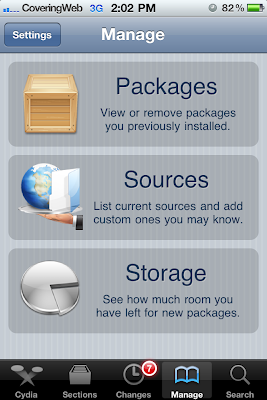
Step 1: Open Cydia on your iPhone 4 or 3GS, Go to Manage->Sources
Step 2: Now tap on “Edit”, then tap on “Add”Enter the following repo http://repo666.ultrasn0w.com then tap on "Add Source" as shown below.Step 3: Now search for ultrasn0w 1.2.3 then install it. By installing ultrasn0w 1.2.3, your device became unlocked
Step 4: Finally, restart your iPhone and you should now enjoy an unlocked iPhone 4 or 3GS on iOS 4.3.3.


Sunday, October 6, 2013
How To Unlock iPhone 4 3GS on iOS 4 3 1 with Ultrasn0w 1 2 1 Guide
iPhone Dev-Team has released ultrasn0w 1.2.1 unlock to support iOS 4.3.1 unlock on old basebands and to fix signal issues which reported by some users after jailbreaking iPhone 4, 3GS on iOS 4.3.1iPhone 3GS preparation for unlock: you have to jailbreak and update your iPhone 3GS to 6.15.00 baseband on iOS 4.1 / 4.2.1We’ve pushed out the 4.3.1 compatibility fix for ultrasn0w in Cydia — it’s now at version 1.2.1. If you’re not already at 4.3.1 and you need the unlock, please be sure you understand how to get to 4.3.1 using a custom IPSW that doesn’t update your baseband.
This isn’t a new unlock! It’s to allow those who are already unlocked to use FW 4.3.1. It also fixes the signal bar issue for those who aren’t using the unlock but retain an older baseband intentionally.
AFTER INSTALLING ULTRASN0W 1.2.1, PLEASE REBOOT YOUR iPHONE using the normal “slide to power off” swipe. T-Mobile users in the USA also should disable 3G mode in Settings->General->Network.
ONLY Supported basebands: (01.59.00 / 04.26.08 / 05.11.07 / 05.12.01 / 05.13.04 / 06.15.00)
Step 1: You have to jailbreak your iPhone 4 / 3GS on iOS 4.3.1 with preserving your old baseband,
Step 2: Once you jailbreak yoour device, you can now unlock your iPhone 4 / 3GS with Ultrasn0w 1.2.1 from Cydia. To do so, follow the steps below:
- Press to launch Cydia Installer from your SpringBoard.
- Press to select the Manage tab at the bottom of the screen.
- Press to select the Sources button.
- Now touch on Edit and then on Add. You will be prompted to enter the URL of the source. Type http://repo666.ultrasn0w.com and touch on Add Source to add this repository.
Cydia will now automatically update your sources by following a series of automated steps.
- After installation is completed. Search for “ultrasn0w 1.2.1” in Cydia and install this application. This app will automatically unlock your iPhone so that you can use it with any carrier.
Step 3: Almost done, now simply reboot your iPhone and you should have a fully unlocked iPhone 3GS / 4 on iOS 4.3.1.


Tuesday, September 24, 2013
iPhone 4 Unlock With GEVEY SIM Blocked By Apple In iOS 5 Beta 2
Apple has blocked iPhone 4 unlock with GEVEY interposer SIM, earlier today Apple seeded iOS 5 beta 2 to developers with some minor changes which also included this. Musclenerd from iPhone-Dev team has confirmed that the hole has been patched and Gevey SIM won’t work with iOS 5 beta 2.

In a tweet today he said :

If you rely on unlock we strongly recommend you not to upgrade to iOS 5 beta 2. Gevey’s SIM Interposer was able to unlock the iPhone 4 by force activating the baseband using the emergency dialer. This hole was not patched in iOS 5 beta 1 release and Gevey SIM worked perfectly.

Apple could’ve waited for the final release but they didn’t and i believe GEVEY won’t try to release another version of Gevey interposer SIM. They most probably will wait for the final release of iOS 5 which is scheduled this fall.
Gevery SIM supported following basebands:
In a tweet today he said :
it’s surprising Apple closed Gevey interposer hole in b2 rather than waiting until final (maybe they were under pressure)
If you rely on unlock we strongly recommend you not to upgrade to iOS 5 beta 2. Gevey’s SIM Interposer was able to unlock the iPhone 4 by force activating the baseband using the emergency dialer. This hole was not patched in iOS 5 beta 1 release and Gevey SIM worked perfectly.
Apple could’ve waited for the final release but they didn’t and i believe GEVEY won’t try to release another version of Gevey interposer SIM. They most probably will wait for the final release of iOS 5 which is scheduled this fall.
Gevery SIM supported following basebands:
- 02.10.xx
- 03.10.xx
- 04.10.xx
- 05.14.xx
- 05.15.xx
- 05.16.xx
If your baseband is mentioned in the list above we strongly recommend you to stay away from iOS 5 Beta 2 as it’ll lock you iPhone4 and you won’t be able to use it for cellular services.
Subscribe to:
Posts (Atom)