Showing posts with label cydia. Show all posts
Showing posts with label cydia. Show all posts
Sunday, October 13, 2013
How To Use Cydia The other App Store
When you jailbreak your phone you get access to Cydia, the iOS app store that exists outside of Apples reach.
There are a number of cool apps and tweaks available there, from apps that turns your phone into a WiFi hotspot to tools that let you completely customize your iPhones interface.
It can be a little daunting at first, especially if youre only familiar with Apples App Store. Heres a tour on how to install and uninstall apps from Cydia.
There are a number of cool apps and tweaks available there, from apps that turns your phone into a WiFi hotspot to tools that let you completely customize your iPhones interface.
It can be a little daunting at first, especially if youre only familiar with Apples App Store. Heres a tour on how to install and uninstall apps from Cydia.


Tuesday, October 8, 2013
CYDER 2 Install Cydia Packages without WiFi 3G Internet Connection
[TUTORIAL]
With Cyder, you can install aplications, (or unlock without wifi) on jailbreacked iphones , without internet or cydia, just put your *.deb aplications on archive Folder, and their appear for install on your iphones.-
the latest version of itunes make probs, using cyder, the files here have solved this problem
You need update itunes to last 10.5 version first!!
Hello everyone !
I remember when I first got my iPodtouch 2G, I didn’t have a Wi-Fi connection. So obviously I was irritated that I couldn’t download any Cydia apps.
Well, I chanced upon Cyder at the time ! And it was great, but it was a bit rusty, had a few bugs and crashed often.
However, its been a while since Cyder 2 has released and it has none of the problems the original Cyder had. So I think it’s only fair that I should write a tutorial on how to use it.
WHAT IS CYDER 2 ??
Cyder 2 is a revamped version of Cyder, a program that lets you browse, download and install the various packages from Cydia sources to your iPodtouch
REQUIREMENTS:
You will need the following :
-Jailbroken iPod touch/iPhone with Cydia
-USB cable
-Cyder 2 [Download Link 1] [Download Link 2]
-SSH Program like WinSCP,iFunBox [OPTIONAL]
How do I use it ?
1)Plug in your iDevice via USB cable
2)Open up Cyder 2
3)You would see the following Tabs on top of the windows – Sources, Packages, Downloads, File Manager,Settings
SOURCES-Add Cydia Sources here
1)If you don’t see sources already click “Get sources from Cydia”. You can also add sources by right clicking. You can transfer the sources over to Cydia and also import installed packages via the buttons.
2) Here is a list of the default Cydia sources:
Quote:
PACKAGES-View Cydia Packages here (Via sources added)
1)You can scroll through a list of packages, or filter them by Source, Section or Modified. You can also Search for packages here.
2)When you select a package (e.g. Winterboard) you can view its details. You can see its dependencies, source, author etc.
3)Download a package by right clicking and choosing to either download only that package or the package and its dependencies. It is preferrable to always download with dependencies.
DOWNLOADS-Download Cydia Packages
1)You can see all packages that are chosen to be downloaded from the Packages section.
2)There is a thumbnail at the right of each package indicating that the package status. [Grey Box=Not Downloaded , Blue Arrow=Downloading, Yellow/Orange Box=Downloaded]
3)You can choose to download whichever packages you want here by right clicking again and choosing from the options.
4)In case you did not choose to Download with dependencies, you can even add the dependencies of a package on this screen.
FILE MANAGER-Manage Downloaded Packages
1)You will see all the packages you downloaded earlier in this tab.
2)You now have the option to either transfer them into Cydia’s Cache , Cydia’s AutoInstall or the AppCake Folder.
3)I prefer transferring to Cydia’s AutoInstall as transferring Cydia’s cache has proved a bit unreliable for me. You can also transfer them into the AppCake folder to install via AppCake
4)To install the packages, drag them into Cydia AutoInstall.
5)Close Cyder 2.
6)Reboot iDevice !
7)Respring iDevice
8)In case the package does not install still try Rebooting and Respringing once more.
SETTINGS-The Control Panel
1)You won’t need to go much into settings and I barely (NEVER) use it.
2)You can use a proxy for transferring packages, edit confirmation messages and check compatibility. (Nothing Great)
3)As I said before you do NOT need to bother about Settings.
THE “Cyder2” Folder
1)The Cyder2 Folder is what you get after you unzip the Cyder2 zip file.
2)In the event that Cyder is unable to install a package for you, you can always obtain the .deb file of that package from this folder.
3)Just navigate to Cyder2/archives for all the .deb files you have downloaded via Cyder.
4)You could now SSH into you iDevice and transfer it to AutoInstall(/var/root/Media/Cydia/AutoInstall) or install via iFile etc.
Jump for Joy ! Kiss your iDevice !
You can now say "Muahahah Wi-Fi I dont need you !"
Thanks for reading guys !


Monday, September 30, 2013
How to Get Cydia 1 1 iPhone iPod Touch iPad Whats New
Cydia 1.1 has just been released. Jay Freeman (aka Saurik) -Cydia creator- has just announced via his Twitter account that Cydia 1.1 is now available. Freeman mentioned that Cydia 1.1 is faster, slimmer and more stable and its including an improved search alogrithm and a "resume where you left off" feature.

 How to get new Cydia 1.1 ? you only have to run Cydia and it will prompt you to run some updates, just accept and it will automatically update your Cydia to version 1.1
Whats New on Cydia 1.1 :
Features of Cydia 1.1 Application:
Multitasking
“This is simply not possible at this time. I realize everyone wants it, and hell: I want it, too; but everyone saying it is important doesn’t make it possible. The reason Cydia doesn’t have iOS 4 compliant multi-tasking is that, to make the modifications it makes to the system, it runs as “root”, a user that has more permissions on the system than anything else, which means that SpringBoard, a lowly process running as “mobile”, cannot suspend/resume it.
Now, this is something that /can/ be remedied, and is something that I’ve been thinking of how to do for a long time, but all the obvious ways people like to bring up for making Cydia’s GUI run as mobile with only small parts running as root would make Cydia run slower, and speed is something that is primary on everyone’s minds when they are using Cydia. Luckily, there are things I’ve figured out that may make this more reasonably possible, but certainly not for this release.”
Leaving Mobile Substrate On while Cydia is Running
“If you did this you would find your system would suddenly become unusable. I realize that it sounds all nice and fuzzy that Mobile Substrate should modify all applications on the system, including Cydia, but again: Cydia runs as root. Almost all extensions in the ecosystem are NOT designed with this in mind, and when suddenly given root access start destroying the permissions of your configuration files and Media folders, making all normal applications unable to use them.
Therefore, with this release of Cydia, I’ve gone through the “big ticket items”-which seem to come down to Activator (what starts SBSettings), libstatusbar (adds notification items to the status bar), and SimulatedKeyEvents (injection of key events from Veency)-to verify with their developers that they will work correctly in an environment running as root. These extensions (plus WinterBoard, which doesn’t work on root on 4.x but is harmless, and will be fixed in a future release) are what are available from inside of Cydia until Cydia is modified to run as mobile.”
Better Interface and Backup Option
“A backup function actually does not require pushing a new build of Cydia, but it requires time to figure out how to scale the users to support the kind of load Cydia has. Cydia is running with many orders of magnitudes more users than any of its competitors have, which means that a lot of things that people like to think “should be simple, X did it” are actually much harder to implement. I also keep privacy at the forefront of my mind while building features like this, and want to be 100% certain that no one can get access to your installed products list other than you.
As for a “better looking interface”, I try hard to maintain something that competes with Apple’s products. A few things rotted on 4.x (the positions and sizes of some buttons), and the various “black” interfaces (the black bar and the black screen) get mixed reports, but otherwise the main problem users have with Cydia is not Cydia: it is with repositories. Every time I’ve gotten actual feedback “this specific thing is bad”, where that thing isn’t something that Apple themselves do in their iTunes or App Store applications (which should be taken as the “intuitive model”), it is in areas of the interface I simply do not have any control over: the content shown for a package by the repository.”
Confusion With the Term “Changes”
“Maybe I’m crazy, but I always thought of the word “Changes” to be a very non-geeky end-user term for “stuff that changed”. It certainly isn’t a technical term: it was not chosen because of some geeky desire to have the codebase match the UI, nor was it chosen because it had some esoteric meaning in Latin or Greek. It was instead chosen as it was a single word that immediately meant to the largest number of people I talked to exactly what that page did: showed you what changed. Regardless, “New Releases/Updates” certainly won’t fit on a tab label.”
Speed – Much more FASTER
“As with /every/ release of Cydia, Cydia 1.1 is faster than previous releases. In specific, it is faster than 1.0.3366 by a good margin, which itself was faster than 1.0.3222 by an even larger chasm. On this note, however, it is important to note that Cydia is tackling a hard problem: no other application I have seen on the iPhone, from Apple or any third party, is attempting to search index and manage tens of thousands of data items, on the client, in real time, aggregated from user-selected sources.
In contrast, Cydia has some of the fastest technology in existence with regards to handling this data, whether it be custom algorithms (Cydia includes a locale-aware string comparison radix sort, which AFAIK is the fastest sorting algorithm in any iOS application) or special on-disk data structures (new in 1.1 is “Cytore”, a new way to store local metadata on packages that can be loaded nearly instantaneously from flash; for those out there who are technically minded, it is an on-disk memory mapped hashtable, which drastically beats out alternatives people like to try to bring up such as SQLite).”
Loading Time – LESS
“Despite myths to the contrary, the amount of data displayed in the Changes list does not drastically affect how quickly it loads. There /was/ a bug in many versions of Cydia 1.0 that caused there to be at least a little delay related to the number of items on the list, but this bug was already fixed as of 1.0.3366. The cost of the calculation is deciding what entries should be on the list at all (and specifically which ones are actually updates vs. new releases), not displaying them all at once. That said, Cydia 1.0.3366 moves the loading of changes until after you click the tab, which makes it more evidence how much time is being spent on this feature (which itself is, again, faster on 1.1).”
Memory Usage – LOW
“Despite Cydia 1.1 continuing to attempt to juggle tens of thousands of items in memory, thanks to Cytore, it uses much less memory than ever before. Other optimizations have been made, as with every version of Cydia, in order to decrease the memory usage of the app as a whole. Additionally, and in particular, Cydia 1.1 is much more conscientious of memory warnings, and attempts to throw out as much state as possible during these events.
That said, the amount of memory on even reasonably modern devices (anything past the iPhone 3G) available for running applications (not in total, but available after Apple’s system applications get their share), is an order of magnitude greater: whereas on an iPhone 3G you were working with maybe 20MB of available memory, on an iPhone 3G[S] you have 150MB, and an on iPhone 4 you have 400MB available. So, despite Cydia 1.1 actually needing less memory to operate than Cydia 1.0, the pressure on memory is pretty much gone, and will not affect future users thanks to hardware upgrades.”
Advanced Search
“Unfortunately, this device is simply too slow to provide “advanced search capabilities”, and certainly not suggestions, given the constraints of “from user-selected repositories” “in something resembling real time”. That said, Cydia 1.1 has a much better search mechanism, including an integer-arithmetic radix-sorted relevancy algorithm I managed to implement.
What would really be needed to have a truly amazing search experience is to not do searching on the client: to instead handle it on my servers. This is how products like the App Store, Kindle, or Netflix work: it is not at all common for services users are used to to attempt to manage the entire database /on the device/, doing local searching, rather than having the data and computation for that existing in offline-indexed search structures on a massive server in the cloud.
Unfortunately, the reason people use Cydia are varied, and many people are using Cydia with repositories that frankly they shouldn’t be: whether the repository contains software that is dangerous (a niche community with tweaks receiving minimal testing, or using bad practices like on-disk file patching) or downright illegal (there are things you are allowed to do in your country that I cannot in mine), I am certainly not going to be acting as the centralized storage and indexing gateway for people to find and manage this content.
Instead, what keeps people coming back to Cydia is the fact that it acts as the fundamental alternative: that rather going to Apple, with their carefully curated set of centralized experiences, you go to Cydia, “the wild west of software”, where software modifies other software in a kind of reckless abandon that is going to lead to pain even in the best possible scenarios, and in the worst possible worlds is going to lead to things that you will not be able to list on a default repository, and which Cydia may even warn you about installing, but which you should still be able to access and even search for using Cydia’s search mechanisms.”
Error Messages
“Errors from Cydia do not come from Cydia. If you type a URL into Cydia for a broken repository, that repository is going to be low-quality and is going to cause you problems. If it is offline, Cydia is going to tell you it is offline, and if it is malformed Cydia is going to get angry about that. Cydia is simply going to sit there idly while there are a ton of broken and offline repositories in your list: it will tell you all of the errors involved in the hope that you will remove the broken repositories and get on with your life (which is a very apt metaphor, as most third party repositories are very slow, and cause your refresh experience to take a very very very long time).”
“Rate” and “Review” Sections
“We actually tried this, and it was a miserable failure: more time had to be spent moderating the reviews, most of which were misleading, inflammatory, or downright inappropriate, than anyone got value out of this mechanism: it was even worse than on the App Store, which is notorious for bad reviews (people often rate down a package for inane reasons, making the data horribly invalid).
Given these issues, I attempted to put together a vision of how comments and ratings could work in Cydia, and even made a trial implementation (screenshots were even handed out at some points, and I did demos at a few conferences), but when word came up that I was even considering releasing it, I received strong pushback from some of the best developers in the ecosystem–the people you are most likely to want to give mega-good reviews to–that if I continued with that they would give up on the ecosystem, due to the issues from before.
And, to be honest, I am not certain that I would have solved those problems, and given subsequent experiences from alternative products, and looking at how people used the ratings, what people said in the comments, and how things finally got rated, I no longer believe that I would have: I believe the concept of the off-the-shelf “comments and ratings” to be a fundamentally flawed system that inherently leads to abuse.
Now, not all rating systems need to be “off-the-shelf”, so something truly innovating and “actually solving the problem” is what I hope to one day provide for Cydia. In the meantime, however, I always do my best to avoid injecting seriously suboptimal tradeoffs into our ecosystem.”
Improved Compatibility Listings
“Cydia has, for a while, contained numerous features that would allow repositories to help with this problem.
a mechanism to specify firmware compatibility on packages (packages can Depends: specific firmware revisions).
the Cydia Store lets vendors block purchases for specific firmwares (any paid product can register its compatibility with its repository, and then I will filter it to users who can use it).
the firmware version is sent as part of the user-agent to the web pages for each product, allowing developers to display their own warnings.
compatibility is even more specially able to be done by feature detection, allowing packages to say “I need voiceover support on a device with a camera running an armv7 CPU and a retina screen”.
In essence, there is very little excuse for packages, repositories, products, or anything else in the Cydia ecosystem to be poorly specified in terms of firmware compatibility. That said, almost no packages in the ecosystem, and even very few products (where one would imagine this to be the most important), have this information included at any of these levels, which is rather disappointing.
So, Cydia 1.1 is not going to attempt to improve on any of these mechanisms, as Cydia 1.0 already has more than enough of them: the real onus is now on the developers and artists of specific items.”
Removal of Dead Content
“I do not have any control over what content is available in Cydia. I mean, I can refuse to personally accept money for it, but I have almost no introspection over things that are either free or sold on the developer’s website. For years I have attempted to get repositories to pull obsolete packages: they refuse. Instead of lobbying me, who agrees with you and is powerless, you need to be sending these complaints to the default repositories: BigBoss, ModMyi, and ZodTTD.”
Install Requirements
(Tags saying if installations of apps/tweaks, etc. need a springboard refresh or if the device needs to reboot)
“While this is often stated, this is simply not how this mechanism works: packages compute whether they need a reboot or reload as they install, allowing packages to make optimizations like “I only need to reboot if the user is using this firmware version and has this other package installed with this setting specified”. In fact, all of my packages that need features like this attempt these optimizations, and often you will not need as many reboots or reloads because of it.
Therefore, specifying this as static tags on a package would increase the number of reboots a user has to perform needlessly. That said, for packages where it is not obvious (extensions are going to require a reload, and MobileSubstrate is going to require a reboot), such as cases of MMS clients that require a reboot, it should certainly be best practice for the developer to put this information on their package information screen. This is even easier for the developer/vendor than modifying the package, and even then is very uncommonly specified: adding the tag therefore won’t even change how often it is reported.”
Repo Management
“With regards to repositories that did not add correctly, as stated by Ryan Petrich, Cydia 1.1 should no longer end up in situations where broken repositories are so unusable that they are also undeletable. That said, many users complain about repositories installed via a package: to delete these repositories you will need to remove the package that represents them.
(Due to some of these complexities, it is Cydia policy going forward that no repositories will be installable from default repositories via packages, and the existing ones under More Sources will be transitioned to a new mechanism for handling these that has been added that will allow more direct, simpler, and safer manipulation of repositories using a soon-to-be-revamped More Sources page.)”
Read More..
Cydia 1.1: faster, slimmer, and more stable; including an improved search algorithm and “resume where you left off”. Available in Cydia now!

Whats New on Cydia 1.1 :
Features of Cydia 1.1 Application:
- Ability to run and operate Activator, libstatusbar, and SimulatedKeyEvents while Cydia is running
- An overall speed improvement, including the “Loading Changes” dialog
- Low memory usage
- Advanced search mechanism with a new relevancy algorithm
- Better management of broken repositories. Broken Repo’s can now be deleted easily.
Multitasking
“This is simply not possible at this time. I realize everyone wants it, and hell: I want it, too; but everyone saying it is important doesn’t make it possible. The reason Cydia doesn’t have iOS 4 compliant multi-tasking is that, to make the modifications it makes to the system, it runs as “root”, a user that has more permissions on the system than anything else, which means that SpringBoard, a lowly process running as “mobile”, cannot suspend/resume it.
Now, this is something that /can/ be remedied, and is something that I’ve been thinking of how to do for a long time, but all the obvious ways people like to bring up for making Cydia’s GUI run as mobile with only small parts running as root would make Cydia run slower, and speed is something that is primary on everyone’s minds when they are using Cydia. Luckily, there are things I’ve figured out that may make this more reasonably possible, but certainly not for this release.”
Leaving Mobile Substrate On while Cydia is Running
“If you did this you would find your system would suddenly become unusable. I realize that it sounds all nice and fuzzy that Mobile Substrate should modify all applications on the system, including Cydia, but again: Cydia runs as root. Almost all extensions in the ecosystem are NOT designed with this in mind, and when suddenly given root access start destroying the permissions of your configuration files and Media folders, making all normal applications unable to use them.
Therefore, with this release of Cydia, I’ve gone through the “big ticket items”-which seem to come down to Activator (what starts SBSettings), libstatusbar (adds notification items to the status bar), and SimulatedKeyEvents (injection of key events from Veency)-to verify with their developers that they will work correctly in an environment running as root. These extensions (plus WinterBoard, which doesn’t work on root on 4.x but is harmless, and will be fixed in a future release) are what are available from inside of Cydia until Cydia is modified to run as mobile.”
Better Interface and Backup Option
“A backup function actually does not require pushing a new build of Cydia, but it requires time to figure out how to scale the users to support the kind of load Cydia has. Cydia is running with many orders of magnitudes more users than any of its competitors have, which means that a lot of things that people like to think “should be simple, X did it” are actually much harder to implement. I also keep privacy at the forefront of my mind while building features like this, and want to be 100% certain that no one can get access to your installed products list other than you.
As for a “better looking interface”, I try hard to maintain something that competes with Apple’s products. A few things rotted on 4.x (the positions and sizes of some buttons), and the various “black” interfaces (the black bar and the black screen) get mixed reports, but otherwise the main problem users have with Cydia is not Cydia: it is with repositories. Every time I’ve gotten actual feedback “this specific thing is bad”, where that thing isn’t something that Apple themselves do in their iTunes or App Store applications (which should be taken as the “intuitive model”), it is in areas of the interface I simply do not have any control over: the content shown for a package by the repository.”
Confusion With the Term “Changes”
“Maybe I’m crazy, but I always thought of the word “Changes” to be a very non-geeky end-user term for “stuff that changed”. It certainly isn’t a technical term: it was not chosen because of some geeky desire to have the codebase match the UI, nor was it chosen because it had some esoteric meaning in Latin or Greek. It was instead chosen as it was a single word that immediately meant to the largest number of people I talked to exactly what that page did: showed you what changed. Regardless, “New Releases/Updates” certainly won’t fit on a tab label.”
Speed – Much more FASTER
“As with /every/ release of Cydia, Cydia 1.1 is faster than previous releases. In specific, it is faster than 1.0.3366 by a good margin, which itself was faster than 1.0.3222 by an even larger chasm. On this note, however, it is important to note that Cydia is tackling a hard problem: no other application I have seen on the iPhone, from Apple or any third party, is attempting to search index and manage tens of thousands of data items, on the client, in real time, aggregated from user-selected sources.
In contrast, Cydia has some of the fastest technology in existence with regards to handling this data, whether it be custom algorithms (Cydia includes a locale-aware string comparison radix sort, which AFAIK is the fastest sorting algorithm in any iOS application) or special on-disk data structures (new in 1.1 is “Cytore”, a new way to store local metadata on packages that can be loaded nearly instantaneously from flash; for those out there who are technically minded, it is an on-disk memory mapped hashtable, which drastically beats out alternatives people like to try to bring up such as SQLite).”
Loading Time – LESS
“Despite myths to the contrary, the amount of data displayed in the Changes list does not drastically affect how quickly it loads. There /was/ a bug in many versions of Cydia 1.0 that caused there to be at least a little delay related to the number of items on the list, but this bug was already fixed as of 1.0.3366. The cost of the calculation is deciding what entries should be on the list at all (and specifically which ones are actually updates vs. new releases), not displaying them all at once. That said, Cydia 1.0.3366 moves the loading of changes until after you click the tab, which makes it more evidence how much time is being spent on this feature (which itself is, again, faster on 1.1).”
Memory Usage – LOW
“Despite Cydia 1.1 continuing to attempt to juggle tens of thousands of items in memory, thanks to Cytore, it uses much less memory than ever before. Other optimizations have been made, as with every version of Cydia, in order to decrease the memory usage of the app as a whole. Additionally, and in particular, Cydia 1.1 is much more conscientious of memory warnings, and attempts to throw out as much state as possible during these events.
That said, the amount of memory on even reasonably modern devices (anything past the iPhone 3G) available for running applications (not in total, but available after Apple’s system applications get their share), is an order of magnitude greater: whereas on an iPhone 3G you were working with maybe 20MB of available memory, on an iPhone 3G[S] you have 150MB, and an on iPhone 4 you have 400MB available. So, despite Cydia 1.1 actually needing less memory to operate than Cydia 1.0, the pressure on memory is pretty much gone, and will not affect future users thanks to hardware upgrades.”
Advanced Search
“Unfortunately, this device is simply too slow to provide “advanced search capabilities”, and certainly not suggestions, given the constraints of “from user-selected repositories” “in something resembling real time”. That said, Cydia 1.1 has a much better search mechanism, including an integer-arithmetic radix-sorted relevancy algorithm I managed to implement.
What would really be needed to have a truly amazing search experience is to not do searching on the client: to instead handle it on my servers. This is how products like the App Store, Kindle, or Netflix work: it is not at all common for services users are used to to attempt to manage the entire database /on the device/, doing local searching, rather than having the data and computation for that existing in offline-indexed search structures on a massive server in the cloud.
Unfortunately, the reason people use Cydia are varied, and many people are using Cydia with repositories that frankly they shouldn’t be: whether the repository contains software that is dangerous (a niche community with tweaks receiving minimal testing, or using bad practices like on-disk file patching) or downright illegal (there are things you are allowed to do in your country that I cannot in mine), I am certainly not going to be acting as the centralized storage and indexing gateway for people to find and manage this content.
Instead, what keeps people coming back to Cydia is the fact that it acts as the fundamental alternative: that rather going to Apple, with their carefully curated set of centralized experiences, you go to Cydia, “the wild west of software”, where software modifies other software in a kind of reckless abandon that is going to lead to pain even in the best possible scenarios, and in the worst possible worlds is going to lead to things that you will not be able to list on a default repository, and which Cydia may even warn you about installing, but which you should still be able to access and even search for using Cydia’s search mechanisms.”
Error Messages
“Errors from Cydia do not come from Cydia. If you type a URL into Cydia for a broken repository, that repository is going to be low-quality and is going to cause you problems. If it is offline, Cydia is going to tell you it is offline, and if it is malformed Cydia is going to get angry about that. Cydia is simply going to sit there idly while there are a ton of broken and offline repositories in your list: it will tell you all of the errors involved in the hope that you will remove the broken repositories and get on with your life (which is a very apt metaphor, as most third party repositories are very slow, and cause your refresh experience to take a very very very long time).”
“Rate” and “Review” Sections
“We actually tried this, and it was a miserable failure: more time had to be spent moderating the reviews, most of which were misleading, inflammatory, or downright inappropriate, than anyone got value out of this mechanism: it was even worse than on the App Store, which is notorious for bad reviews (people often rate down a package for inane reasons, making the data horribly invalid).
Given these issues, I attempted to put together a vision of how comments and ratings could work in Cydia, and even made a trial implementation (screenshots were even handed out at some points, and I did demos at a few conferences), but when word came up that I was even considering releasing it, I received strong pushback from some of the best developers in the ecosystem–the people you are most likely to want to give mega-good reviews to–that if I continued with that they would give up on the ecosystem, due to the issues from before.
And, to be honest, I am not certain that I would have solved those problems, and given subsequent experiences from alternative products, and looking at how people used the ratings, what people said in the comments, and how things finally got rated, I no longer believe that I would have: I believe the concept of the off-the-shelf “comments and ratings” to be a fundamentally flawed system that inherently leads to abuse.
Now, not all rating systems need to be “off-the-shelf”, so something truly innovating and “actually solving the problem” is what I hope to one day provide for Cydia. In the meantime, however, I always do my best to avoid injecting seriously suboptimal tradeoffs into our ecosystem.”
Improved Compatibility Listings
“Cydia has, for a while, contained numerous features that would allow repositories to help with this problem.
a mechanism to specify firmware compatibility on packages (packages can Depends: specific firmware revisions).
the Cydia Store lets vendors block purchases for specific firmwares (any paid product can register its compatibility with its repository, and then I will filter it to users who can use it).
the firmware version is sent as part of the user-agent to the web pages for each product, allowing developers to display their own warnings.
compatibility is even more specially able to be done by feature detection, allowing packages to say “I need voiceover support on a device with a camera running an armv7 CPU and a retina screen”.
In essence, there is very little excuse for packages, repositories, products, or anything else in the Cydia ecosystem to be poorly specified in terms of firmware compatibility. That said, almost no packages in the ecosystem, and even very few products (where one would imagine this to be the most important), have this information included at any of these levels, which is rather disappointing.
So, Cydia 1.1 is not going to attempt to improve on any of these mechanisms, as Cydia 1.0 already has more than enough of them: the real onus is now on the developers and artists of specific items.”
Removal of Dead Content
“I do not have any control over what content is available in Cydia. I mean, I can refuse to personally accept money for it, but I have almost no introspection over things that are either free or sold on the developer’s website. For years I have attempted to get repositories to pull obsolete packages: they refuse. Instead of lobbying me, who agrees with you and is powerless, you need to be sending these complaints to the default repositories: BigBoss, ModMyi, and ZodTTD.”
Install Requirements
(Tags saying if installations of apps/tweaks, etc. need a springboard refresh or if the device needs to reboot)
“While this is often stated, this is simply not how this mechanism works: packages compute whether they need a reboot or reload as they install, allowing packages to make optimizations like “I only need to reboot if the user is using this firmware version and has this other package installed with this setting specified”. In fact, all of my packages that need features like this attempt these optimizations, and often you will not need as many reboots or reloads because of it.
Therefore, specifying this as static tags on a package would increase the number of reboots a user has to perform needlessly. That said, for packages where it is not obvious (extensions are going to require a reload, and MobileSubstrate is going to require a reboot), such as cases of MMS clients that require a reboot, it should certainly be best practice for the developer to put this information on their package information screen. This is even easier for the developer/vendor than modifying the package, and even then is very uncommonly specified: adding the tag therefore won’t even change how often it is reported.”
Repo Management
“With regards to repositories that did not add correctly, as stated by Ryan Petrich, Cydia 1.1 should no longer end up in situations where broken repositories are so unusable that they are also undeletable. That said, many users complain about repositories installed via a package: to delete these repositories you will need to remove the package that represents them.
(Due to some of these complexities, it is Cydia policy going forward that no repositories will be installable from default repositories via packages, and the existing ones under More Sources will be transitioned to a new mechanism for handling these that has been added that will allow more direct, simpler, and safer manipulation of repositories using a soon-to-be-revamped More Sources page.)”
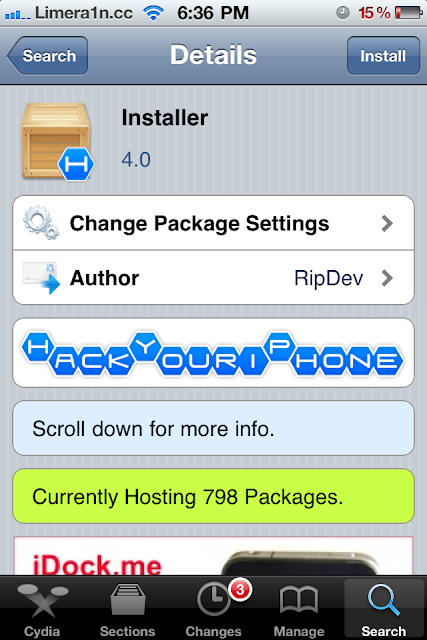
How to Get Installer iPhone iPod Touch iPad Cydia Alternative
Infini-Dev, the guys behind Installer - the worlds first 3rd party app store - have successfully ported Installer to jailbroken iOS 4.3.3.

How does Installer work :
Step 1: You MUST have jailbroken iPhone, iPod or iPad, to jailbreak click
Step 2: Open Cydia > Manage > Edit > Add then add this repo "http://fr0stdev.co.cc/repo"

Step 3: Search for "Installer" and install it, congratulations, you will find Installer icon on your Springboard
Read More..

Yesterday we had succeed "porting" Installer to 4.3.3 and below.
Installer was worlds first 3rd party app store, Introduced by NullRiver, or later known as RipDev.
RipDev was awesome at Installers, they also made Icy, Hood, and other apps.
Icy is also ported by us, and released 1 month ago.
How does Installer work :
Installer works with a different system than Cydia, that wy you wont be able to add a Cydia repo into installer.How to install Installer on iPhone, iPod touch or iPad :
As we speak we are working on a new community source for installer only, wich means you will be able to install things via installer.
We could use help, you may help us by submitting apps that where hosted by installer, or apps that have the installer structure. Or by making app with a installer structure.
Right now, Installer claims to work on every single iOS released after 2.1, even on 4.3.3
Step 1: You MUST have jailbroken iPhone, iPod or iPad, to jailbreak click
Step 2: Open Cydia > Manage > Edit > Add then add this repo "http://fr0stdev.co.cc/repo"
Step 3: Search for "Installer" and install it, congratulations, you will find Installer icon on your Springboard
Wednesday, September 25, 2013
Jailbreak news Unsafe Siri iPhone 4 port debuts on Cydia iOS 5 downgrade via iFaith
We know Apple previously tested Siri on iPhone 4 and older devices but hasn’t enabled the voice recognition software to work on customers’ iOS devices released before the iPhone 4S. Meanwhile however, the hacking community cracked Apple’s digital secretary to work on jailbroken devices and ported the dictation feature to iPhone 4. And now, it looks like a Chinese hacker group called CD-Team was able to create the first fully-featured Siri port. Called H1Siri, it’s already available on Cydia, a third-party store carrying unsanctioned software for jailbroken devices. The hack lets you use the full range of Siri features on both jailbroken fourth-generation iPod touch and GSM/CDMA iPhone 4 running either iOS 5.0 or the latest 5.0.1 version.
According to iClarified, the 100MB download is available via both Cydia.be and iphone3gsystem.fr/cydia repositories (select Manage > Sources > Edit in Cydia, add the sources and do a search for H1Siri). Be advised that H1Siri comes from a relatively unknown party and contains cracks so it’s likely illegal. Also note it passes your personal information to a shady third-party server. If you’re interested, a how-to guide is available here. Some think the hack takes advantage of SiriProxy, a proxy server that fools Siri into believing it is talking to Apple’s servers.
Please note that we couldn’t determine at press time the magic behind this tweak and some users reported intermittent connectivity issues, another indication of H1Siri talking to a third-party proxy server rather than communicate with the Apple cloud directly. The Siri Proxy project has been used to enable interesting uses, from managing a radio-controlled thermostat to controlling your Plex media center to starting your car.
As for jailbreaking, those waiting for an untethered iOS 5 jailbreak will be happy to know that a new tool is now available for easy downgrading to iOS 5.0…
Called iFaith, a Windows application, it lets you circumvent Apple’s restricted downgrade system which prevents people from downgrading their devices to an older iOS 5.x firmware. The new version, iFaith 1.4, works around that Apple-imposed limitation by permitting unsigned restores based on dumped iOS 5 signature hash blobs. This is important because, as noted by MuscleNerd, an upcoming untethered iOS 5 jailbreak might require iFait for user restores. According to the iFaith developer, iH8sn0w, it is possible to restore to iOS 5.0.1 and preserve iPhone 4 baseband by dumping the blobs with iFaith first. The tool does not support A5 devices yet. Because the sn0wbreeze tool (another iH8sn0w’s creation) isn’t capable of iFaith blobs yet, users are advised to use the redsn0w app. More information in iH8sn0w’s video tour included below. As for Siri, an iPhone 4S exclusive that currently understands and can speak English, French and German, Apple says “in 2012, Siri will support additional languages, including Japanese, Chinese, Korean, Italian, and Spanish”. Apple’s language technologies engineers are already hard at work developing Siri for the Chinese market.
Tuesday, September 17, 2013
Install Cydia On iOS 6
A few days ago, the iPhone DevTeam has released a dev-only version of redsn0w that can tethered jailbreak iOS 6. Being a dev-only jailbreak, the only access you’ll get to the device is through SSH or afc2. Cydia will not be installed.
If you want to install Cydia, jump over the break to see how it’s done…
NOTE: even though you will be able to install Cydia, there’s not much use to it. This jailbreak is dev-only for a reason. Most of the Cydia stuff is broken in iOS6.
NOTE: in our honest opinion most of you shouldn’t even bother with this jailbreak, but hey… doing this is so much more exciting than most of the sh… stuff the jailbreak scene had to offer us lately. So get busy. Just for fun…
HOW TO:
1. Download redsn0w and jailbreak your device. You can download redsn0w for iOS 6 here. Read the entire article twice if needed. If at some point there’s something you don’t understand, just stop there and wait for a public iOS 6 release and an official untethered jailbreak.
2. Once jailbroken, open terminal app ( on windows you can use putty or something similar ) and type:
ssh root@ip ( where ‘ip’ is your iPhone’s IP address )
alpine
wget -q -O /tmp/cyinstall.sh http://wyndrepo.googlecode.com/files/cyinstall.sh && chmod 755 /tmp/cyinstall.sh && /tmp/cyinstall.sh
3. That’s it. If you do not see cydia, power off and reboot tethered.

Subscribe to:
Posts (Atom)